Forward Collision Warning (FCW) with Mitigation
Forward Collision Warning with Mitigation (FCW) provides the driver with audible and visual warnings (in the instrument cluster display) and may apply a haptic warning in the form of a brake jerk to alert the driver when it detects a potential forward collision. The warnings and limited braking are designed to give the driver sufficient time to react, avoid, or mitigate a potential collision.
NOTE:
FCW monitors information from the forward-looking sensors, as well as the Electronic Stability Control (ESC) system, to calculate the likelihood of a forward collision. When the system determines that a forward collision is likely, the driver will be provided with audible and visual warnings and may be provided a brake pre-charge warning. If the driver does not take action based on these progressive warnings, the system will then provide a limited level of active braking to help slow the vehicle and mitigate a potential forward collision. If the driver responds to the warnings by braking, and the system determines that the driver intends to avoid a collision by braking but has not applied sufficient braking force, the system will supplement and provide additional braking force as needed. If the Forward Collision Warning with Mitigation event begins at a speed below 20 mph (32 km/h), the system may provide full or partial braking to mitigate a potential forward collision. If the Forward Collision Warning with Mitigation event brings the vehicle to a complete stop, the system will hold the vehicle stationary for two seconds and then release the brakes.
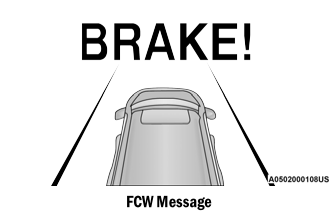
When the system determines that a collision with the vehicle ahead is no longer likely, the warning message will be deactivated.
NOTE:
- The minimum speed for FCW activation is 1 mph (2 km/h).
- FCW warnings may be triggered by non-vehicle objects, such as guardrails or road markers, based on course prediction. This is expected and is part of normal FCW activation and functionality.
- It is unsafe to test the FCW system. To prevent such misuse of the system, after four active braking events in one ignition cycle, the active braking function of FCW will be deactivated until the next ignition cycle.
- The FCW system is intended for on-road use only. If the vehicle is driven off-road, the FCW system should be deactivated to prevent unnecessary warnings due to surrounding terrain.
Turning FCW On or Off
The FCW button is located in the Uconnect display in the controls settings. Forward Collision Warning can be checked or unchecked.
When FCW is turned off, the "FCW OFF" icon will appear in the instrument cluster display.
When the FCW status is changed to "Off," the system will not warn you of a possible collision with the vehicle ahead.
NOTE:
By default, the FCW system is on. The FCW system status is retained in memory from one ignition cycle to the next. If the system is turned off, it will remain off when the vehicle is restarted.
Changing FCW and Active Braking Status
FCW Sensitivity and Active Braking settings are programmed through the Uconnect system.
The default FCW status is the "Far" setting, and Active Braking is set to "On." This allows the system to warn you of a possible collision with the vehicle ahead when you are farther away, and applies limited braking. This gives you the most reaction time to avoid a possible collision.
Changing the FCW status to the "Near" setting allows the system to warn you of a possible collision with the vehicle ahead when you are much closer. This setting provides less reaction time than the "Far" setting, allowing for more dynamic driving.
NOTE:
- The system will retain the last setting selected by the driver after the ignition is turned on again after a malfunction.
- FCW may not respond to non-relevant objects, such as overhead objects, ground reflections, objects not in the vehicle's path, stationary objects that are far away, oncoming traffic, or lead vehicles traveling at the same or higher speed.
- FCW is turned off in the same way as ACC, and a screen indicating that this feature is unavailable is displayed if it is turned off.
FCW Limited Functionality Warning
If "ACC/FCW Limited Functionality" or "ACC/FCW Limited Functionality Clean Front Windshield" appears in the instrument cluster display for a moment, a condition may exist that limits FCW functionality. Although the vehicle can still be driven under normal conditions, active braking may not be fully available. Once the condition limiting system performance is no longer present, the system will return to full operational status. If the problem is not resolved, see an authorized dealer.
FCW Service Warning
If the system turns off and the following message appears in the instrument cluster display:
- ACC/FCW Unavailable Service Required
- Cruise/FCW Unavailable Service Required
This indicates an internal system fault. Although the vehicle can still be driven under normal conditions, see an authorized dealer to have the system inspected.
Test yourself
A quick Dodge Charger quiz: every answer comes with an explanation and a link to the manual page.