Smartphone docking
(for versions/markets, where provided)
Depending on the trim level, a smartphone holder for mounting on the dashboard may be supplied with the vehicle.
Installing/removing the holder
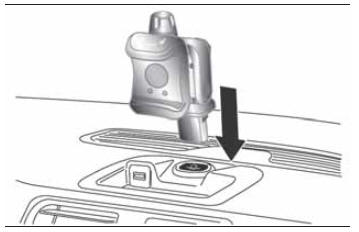
To install the smartphone holder, insert it into the dedicated seat on the dashboard, as shown in fig. 34 (snap-fit mounting).
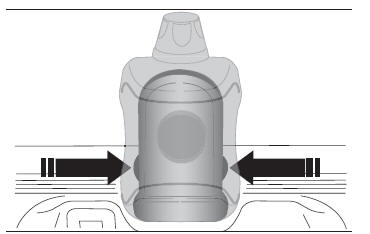
To remove the holder, press both side buttons at the same time, fig. 35.
NOTE To avoid rattling and/or vibration, remove the smartphone holder from its seat when it is not in use.
Inserting/removing the smartphone
To insert the smartphone into the holder:
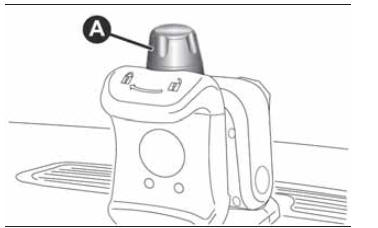
- make sure ring A, fig. 36, is turned to the position
 ;
- insert the smartphone horizontally into the seat, resting it on the base of the holder, and press to open the gripping arms, fig. 37;
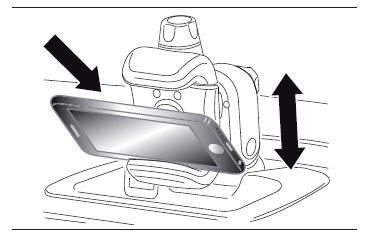
- place the smartphone on the front base and release. The spring inside the holder will close the gripping arms;
- lock the smartphone by turning ring A, fig. 36, until it clicks into position
 .
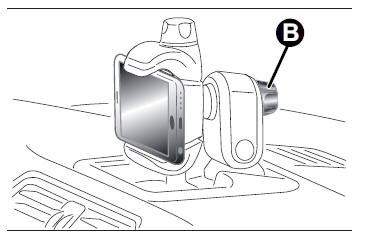
- Rear knob B, fig. 38, allows adjustment according to the weight and shape of the smartphone.
To remove the smartphone from the holder:
- turn ring A, fig. 36, until it clicks into position
 ;
- take out the smartphone by pressing down to open the gripping arms;
- remove the smartphone from the holder and release. The spring inside the holder will close the gripping arms after the smartphone is removed.
Any other holder position is permitted only with the vehicle stationary, for the sole purpose of making it easier to insert the smartphone into the holder.
8) The maximum dimensions of usable smartphones are: 67 mm (width) and 11 mm (depth).
9) The maximum weight of the smartphone that can be installed is 180 g.
Test yourself
A quick Fiat Panda quiz: every answer comes with an explanation and a link to the manual page.