Automatic Climate Control
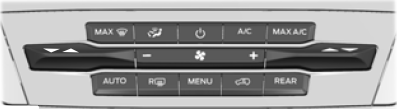
Accessing the Air Distribution Controls
 Press and release the button to activate the selection screen.
From the screen, switch the airflow directed to the windshield, instrument panel, or floor vents on or off. You can direct air through any combination of these vents. See Climate Control.
Accessing the Menu
 Press and release the button to access various climate features.
Smart Zone – Hybrid Electric Vehicle (HEV), Plug-in Hybrid Electric Vehicle (PHEV)
If there is no passenger in the front passenger seat, the climate control system may default to one zone to improve fuel economy if you were previously in dual-zone mode. When this happens, dual-zone is turned off and the passenger setting changes to match the driver setting.
Press the dual-zone button on the touchscreen or adjust the passenger setting to use dual-zone mode without a passenger present. The system remains in dual-zone mode until you turn the vehicle off.
You can turn the Smart Zone feature off or on again by pressing and holding the dual-zone button on the touchscreen. Both setting indicators will flash to show that the feature is turned off. The system returns to its previous state after you release the dual-zone button.
Accessing Rear Climate Control
 Press and release the button to access additional rear climate control features.
Setting the Fan Speed
 Press and release + or - to adjust the volume of air circulating in the vehicle.
Setting the Temperature

 Press the left side climate control toggle up or down to set the left temperature.
Press the right side climate control toggle up or down to set the right temperature.
Turning Automatic Mode On and Off
 Press and release the button to turn on automatic operation. Press the button repeatedly to cycle through the automatic mode settings.
The system adjusts the blower motor speed, air distribution, air conditioning operation, and outside or recirculated air to achieve and maintain the temperature you set.
In humid conditions, the system adjusts the blower motor speed, air distribution, and air conditioning operation to reduce window fogging.
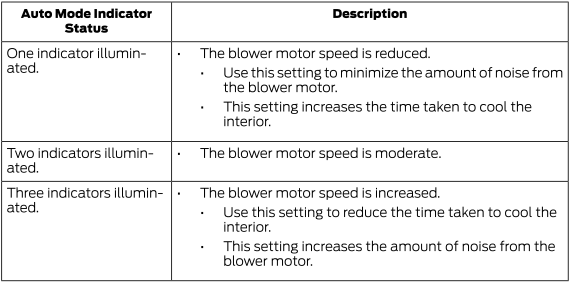
Automatic Mode Indicator Status
Turning the Air Conditioning On and Off
 Press and release the button.
Use recirculated air with the air conditioning to improve cooling efficiency and performance.
Turning Climate Control On and Off
 Press and release the button.
Turning Maximum Air Conditioning On and Off
 Press and release the button for maximum cooling.
Driver and passenger temperature is set to LO, recirculated air flows through the instrument panel vents, the A/C turns on, and the blower motor adjusts to maximum speed.
Turning Maximum Defrost On and Off
 Press and release the button for maximum defrost.
Driver and passenger temperature is set to HI, air flows through the windshield vents, and the blower motor adjusts to maximum speed.
You can also use this setting to prevent fogging and to clear a thin coating of ice from the windshield.
Turning Recirculated Air On and Off
 Press and release the button to switch between outside air and recirculated air.
Air currently inside the vehicle is recirculated. This can reduce the time needed to cool the interior when using the A/C and reduce unwanted odors from entering your vehicle.
Test yourself
A quick Ford Explorer quiz: every answer comes with an explanation and a link to the manual page.