Infotainment Systems
Microphone. Removal and Installation
In this manual: Infotainment Systems
8steps
~48min
2/5difficulty
Done 0 of 8
Special Service Tools / General Equipment
Interior trim removal tool
Removal
Headliner Microphone
Pry the microphone bezel from the headliner. Mounting bracket and remove the microphone from the headliner by grasping the microphone pigtail.- Disconnect the electrical connector.
Use the general equipment: interior trim removal tool.
- Disconnect the electrical connector.
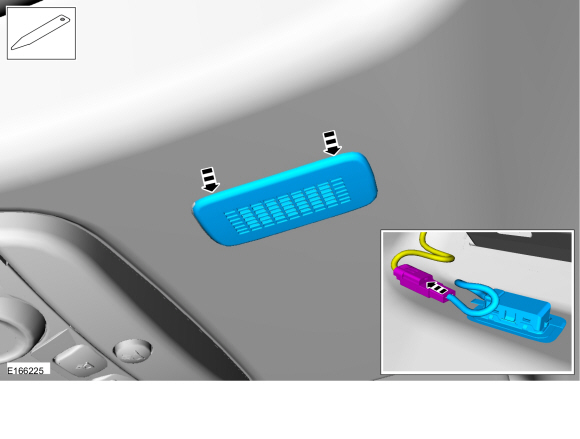 |
Overhead Console Microphone
Remove the overhead console lamp switch.- Disconnect the electrical connectors.
Use general equipment: interior trim removal tool.
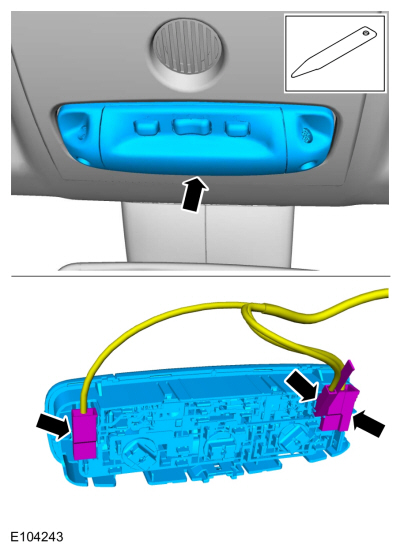
- Disconnect the electrical connectors.
Remove the screws and the overhead console.- Disconnect the electrical connector.
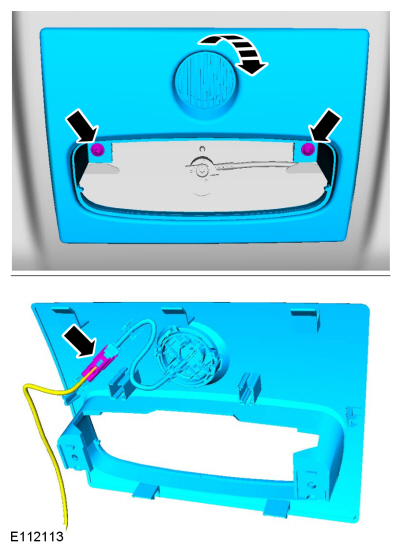
- Release the tabs, disconnect the retainer and remove the sync microphone.
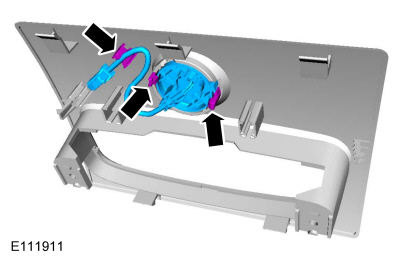
Installation
Headliner Microphone
- Connect the microphone electrical connector.
- Wrap the connection with anti-rattle tape.
- Insert the microphone pigtail into the headliner through the microphone opening. Check the microphone pigtail points toward the front of the vehicle.
- Insert the microphone into the headliner mounting bracket.
- Install the headliner mounting bracket into the headliner.
Overhead Console Microphone
- To install, reverse the removal procedure.
Test yourself
A quick Ford Fiesta quiz: every answer comes with an explanation and a link to the manual page.
Was this page helpful?