Navigation system
Getting started
CAUTION
Using the system with the engine off will drain the battery.
Note: Charges apply for sending and receiving text messages.
Note: Refer to your phone's user manual for information on all of the phone's functions and operation.
Note: Keep the activation code (printed on the installation instructions) in a safe place.
Note: Keep the activation text message in your mobile phone's inbox.
Phone compatibility
CAUTION
As there is no common standard, mobile phone manufacturers may implement different profiles in their Bluetooth devices. This may result in incompatibility between the phone and the hands-free system, which can sometimes significantly impair system performance. To avoid this, only use recommended phones.
Please visit the website www.ford-mobile-connectivity.com for full details.
Installing the SD card
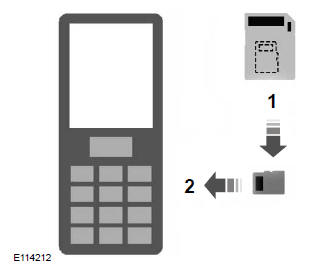
1. Remove the SD card from the adapter.
2. Insert the SD card into your mobile phone.
Activating the navigation system on your mobile phone
Note: Switch on the radio before connecting your mobile phone to the GPS receiver installed in the vehicle.
Note: The Ford Mobile Navigation system must be installed and activated on your mobile phone.
Note: A maximum of three phones can be activated.
Note: Detailed instructions are available on the SD card and on the website www.ford-mobile-connectivity.com.
To connect a device to the system, follow the same procedure as for Bluetooth hands-free phones. See Bluetooth settings.
1. Switch on the radio.
2. Switch on your mobile phone and start "Ford Mobile Navigation".
3. Select "Navigation".
4. Select "Enter address".
5. If necessary, change the route options and start route guidance.
6. The next turn information is shown on the vehicle display. Voice instructions are heard through the vehicle speakers.
Note: Your mobile phone will display your current position.
7. You can exit the application and continue route guidance after restarting the application.
Test yourself
A quick Ford Fiesta quiz: every answer comes with an explanation and a link to the manual page.