Radio overview
Note: The unit has a built-in multifunction display above the CD slot. It shows important information about operating the audio system. In addition, a number of icons surround the display and light up when the related function is active (for example, CD, Radio or Aux (external device)).
Type 1
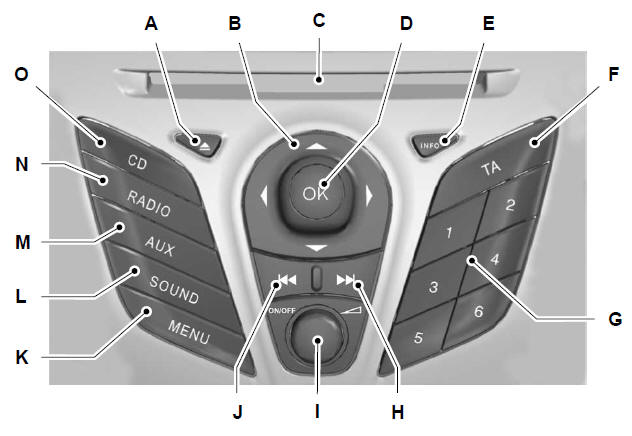
- CD eject. See CD player
- Navigation arrows.
- CD slot. See CD player
- OK.
- Information.
- Traffic information. See Traffic information control
- Preset buttons. See Preset buttons
- Seek up. Track selection on CD. See Tuning (page 176). See Track selection
- Power on/off and volume control.
- Seek down. Track selection on CD. See Tuning (page 176). See Track selection
- Menu selection.
- Sound adjustment button. See Sound button
- External device selection. See Auxiliary input socket (AUX IN) (page 92). See Auxiliary audio input (AUX-IN)
- Radio and waveband selection. See Radio operation
- CD selection. See CD player
Type 2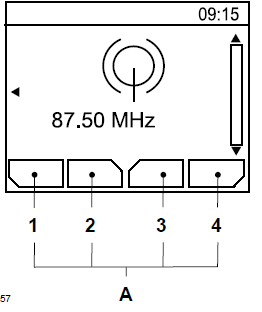
- Function buttons 1-4 descriptions
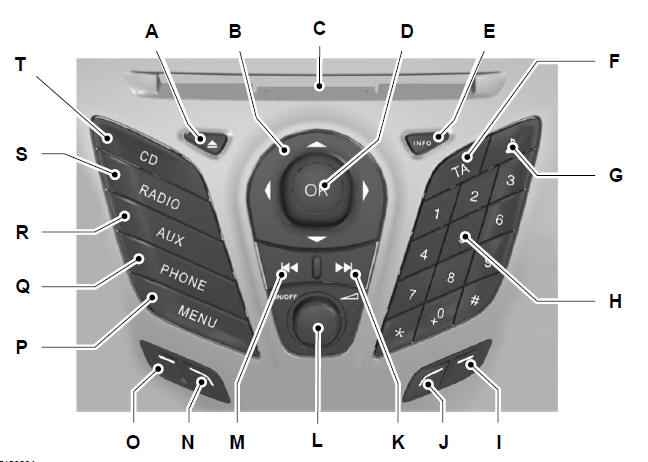
- CD eject. See CD player
- Navigation arrows.
- CD slot. See CD player
- OK.
- Information.
- Traffic information. See Traffic information control
- Sound adjustment button. See Sound button
- Phone keypad and preset buttons. See Using the phone (page 190). See Preset buttons
- Function 4.
- Function 3.
- Seek up. Track selection on CD. See Tuning (page 176). See Track selection
- Power on/off and volume control.
- Seek down. Track selection on CD. See Tuning (page 176). See Track selection
- Function 2.
- Function 1.
- Menu selection.
- Phone menu. See Phone
- External device, USB and iPod selection. See Auxiliary input socket (AUX IN) (page 92). See Auxiliary audio input (AUX-IN) (page 186). See Connectivity
- Radio and waveband selection. See Radio operation
- CD selection. See CD player
The functions of function buttons 1 - 4 are context-dependent and change according to the currently selected operating mode of the unit. The function descriptions are shown at the bottom of the display screen.
Type 3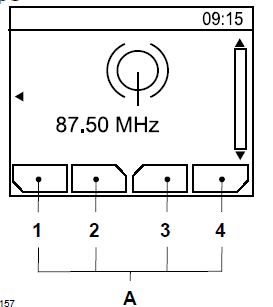
- Function buttons 1-4 descriptions
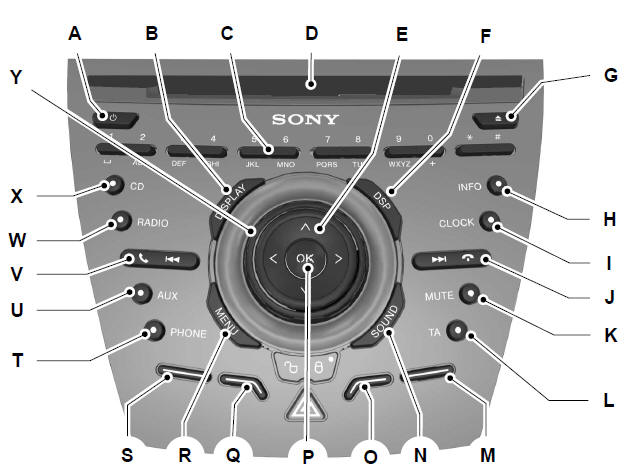
- Switching on or off.
- Screen selection.
- Phone keypad and preset buttons. See Using the phone (page 190). See Preset buttons
- CD slot. See CD player
- Navigation arrows.
- DSP correction function selection. See Digital Signal Processing (DSP)
- CD eject. See CD player
- Information.
- Clock.
- Seek up. Track selection on CD. End phone call. See Tuning (page 176). See Track selection (page 181). See Using the phone
- Mute.
- Traffic information. See Traffic information control
- Function 4.
- Sound adjustment button. See Sound button
- Function 3.
- OK.
- Function 2.
- Menu selection.
- Function 1.
- Phone menu. See Phone
- External device selection. See Auxiliary input socket (AUX IN) (page 92). See Auxiliary audio input (AUX-IN)
- Seek down. Track selection on CD. Accept phone call. See Tuning (page 176). See Track selection (page 181). See Using the phone
- Radio and waveband selection. See Radio operation
- CD selection. See CD player
- Volume adjustment.
The functions of function buttons 1 - 4 are context-dependent and change according to the currently selected operating mode of the unit. The function descriptions are shown at the bottom of the display screen.
Test yourself
A quick Ford Fiesta quiz: every answer comes with an explanation and a link to the manual page.