Connected Vehicle
In this manual: Connected Vehicle
16steps
~96min
4/5difficulty
Done 0 of 16
Connected Vehicle Requirements.
The connected service and related features require a compatible vehicle network.
Some remote features require a subscription. For more information, refer to the FordPass app. Some restrictions, third-party terms and message or data rates may apply.
Connected Vehicle Limitations
Evolving technologies or evolving cellular network may affect the functionality, availability or continued provision of some features. These changes may even stop some features from functioning.
Connecting the Vehicle to a Mobile Network
What is a Modem
 The modem provides access to a number of features built into your vehicle.
Turning the Modem On and Off
- Select Settings.
- Select FordPass Connect .
- Select Connection Settings .
- Turn the connectivity features on or off.
Connecting FordPass to the Modem
- Make sure the modem is turned on using the vehicle settings menu.
- Open the FordPass app on your device and log in.
- Add your vehicle or select your vehicle if already added.
- Select the option for vehicle details.
- Select the option to activate your vehicle.
- Make sure the name on the screen matches the name shown on your FordPass account.
- Confirm that the FordPass account is connected to the modem.
Connecting the Vehicle to a Wi-Fi Network
- Select Settings.
- Select Wi-Fi .
- Turn System Wi-Fi on.
- Select View Available Networks .
- Select an available Wi-Fi network.
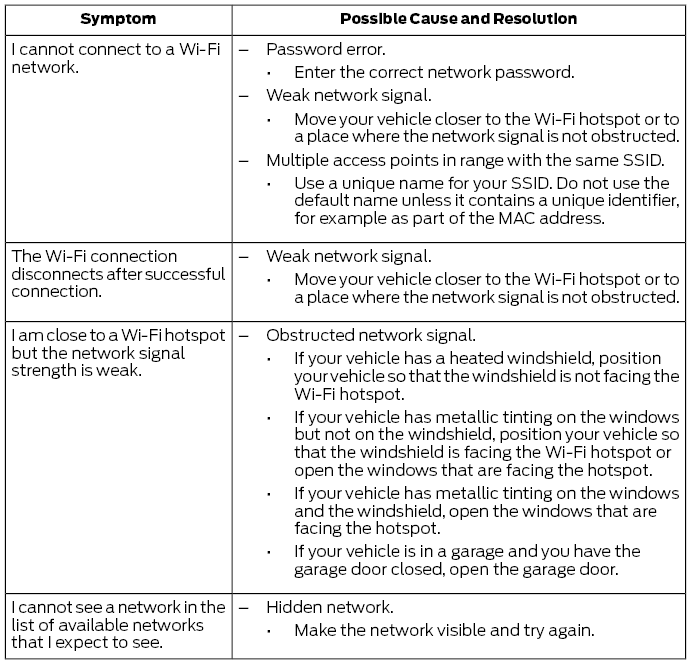
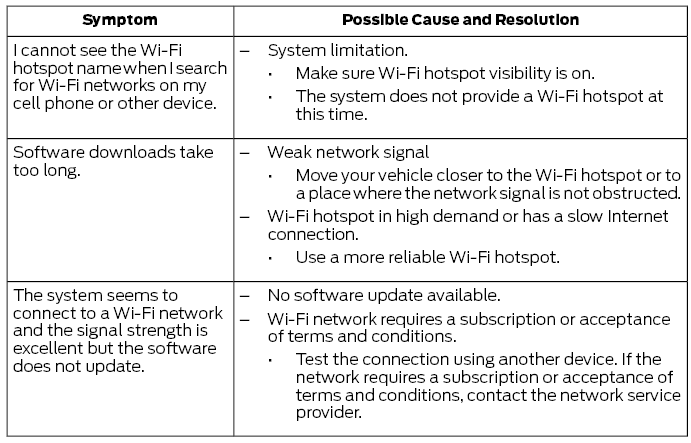
Connected Vehicle — Troubleshooting
Test yourself
A quick Ford Fusion quiz: every answer comes with an explanation and a link to the manual page.
Was this page helpful?