Speed limiter
DANGER
When driving downhill, the vehicle speed may exceed the set value. The system does not apply the brakes but displays a warning. Failure to follow these instructions may cause serious injury, even fatal.
The system allows you to set a speed at which the vehicle will be limited. The set speed becomes the actual maximum speed of the vehicle, but with the option of temporarily exceeding this limit if necessary.Using BLIS
Note: the set speed limit can be intentionally exceeded, if necessary, for a short period of time (e.g. when overtaking another vehicle).The system is operated using the controls mounted on the steering wheel.
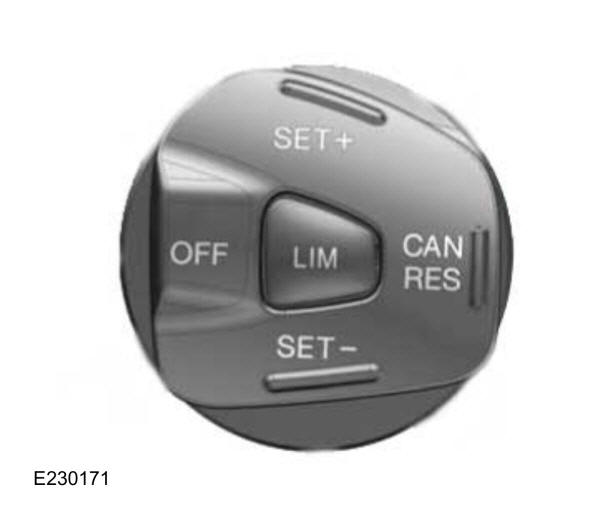
Press LIM to set the speed limiter to standby mode. The information display will prompt you to set a speed. Press OFF again to switch the system off.
Setting the speed limit- With the speed limiter in standby mode, press SET+ or SET- to set it to the current vehicle speed.
- Press SET+ or SET- to select the desired speed limit. The speed is shown on the information display and stored as the set speed.
- Press CAN to cancel the speed limiter and put it into standby mode. The information display confirms that it is switched off by showing the set speed crossed out.
- Press RES to resume the speed limiter. The information display confirms that it is switched on by showing the set speed again.
Briefly press the accelerator pedal fully down to deactivate the system. The system reactivates once the vehicle speed drops below the set speed.
System messagesIf you unintentionally exceed the set speed, the indication will flash on the information display and an audible signal will sound.
If you intentionally exceed the set speed, the set speed indication on the information display flashes.Test yourself
A quick Ford Ka quiz: every answer comes with an explanation and a link to the manual page.