Collision Warning System
OPERATING PRINCIPLE
WARNINGS
- You are responsible for controlling your vehicle at all times. This system does not relieve you of your responsibility to drive with proper attention and care. Failure to follow these instructions may result in loss of control of your vehicle and serious or fatal injury.
- For optimal performance, the braking system must be broken in. See (page 161). Failure to follow these instructions could result in loss of control of your vehicle and serious or fatal injury.
- The system does not detect cyclists, animals, pedestrians at night or vehicles traveling in another direction. Failure to follow these instructions could result in loss of control of your vehicle and serious or fatal injury.
- The system does not operate during sudden acceleration or sharp cornering. Failure to follow these instructions could result in a collision or personal injury.
- In cold weather or in severe weather conditions, the system may not operate or its performance may be reduced.
Note: the Pre-Collision Assist system is activated when the speed is above approximately 5 km/h.

If your vehicle is rapidly approaching another stationary vehicle, a vehicle traveling in the same direction or a pedestrian in your path, the system is designed to provide three levels of action:
- Alarm
- Brake assist
- Active braking
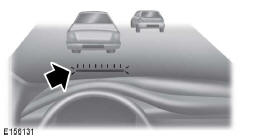
Alarm: when activated, a red indicator flashes, an audible signal sounds and a warning message appears in the information display.
Brake assist: the brake assist system helps the driver reduce collision speed by applying the brakes lightly. If the risk of collision increases further while the indicator is lit, brake assist prepares the braking system for rapid braking. The driver may notice this action. The system does not apply the brakes automatically, but it can apply the full braking force when you press the brake pedal, even lightly.
Active braking: active braking may be applied if the system determines that a collision is imminent. The system can help the driver reduce collision damage or avoid a collision.
Note: if the pre-collision assist alerts seem too frequent or intrusive, you can reduce the alert sensitivity. However, the manufacturer recommends using the highest sensitivity settings where possible. Lower sensitivity settings result in fewer and later system warnings.
Distance warning
If the distance to the vehicle ahead becomes too short, the red indicator lights up on the windshield.
Note: the red bar is smaller and does not flash when distance warning is activated.
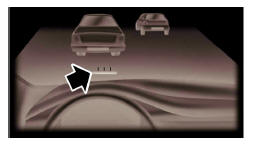
Distance indication
Distance indication is a function that provides a graphic display of the time gap between you and other vehicles traveling in the same direction.
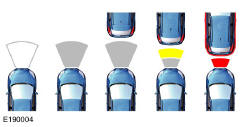
Note: distance warning and distance indication are deactivated when adaptive cruise control is activated. The graphic distance indication appears in the information display only if adaptive cruise control is deactivated.
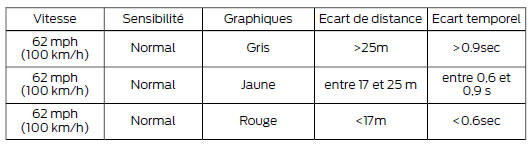
Pre-collision assist settings
You can adjust the sensitivity of the alarm and distance warning to one of three settings using the information display controls. See (page 89).
You can also deactivate the distance indication function using the information display controls.
See (page 89).
If necessary, you can deactivate active braking using the information display controls. See (page 89).
Note: active braking is automatically activated each time you switch the ignition on.
Blocked sensors
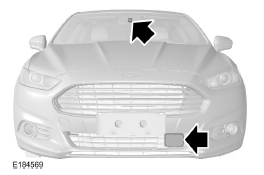
If the information display shows a message about a blocked sensor or front camera, the radar signals or camera images are being obstructed. The radar sensor is located behind a cover on the driver's side of the lower grille. When the radar is obstructed, the pre-collision assist system does not operate and cannot detect a vehicle ahead. When the front camera is obstructed, pre-collision assist performance is reduced. The following table lists the possible causes of the messages and the actions to take.
| Cause | Action |
| The radar surface in the grille is dirty or obstructed in some way. | Clean the surface of the grille in front of the radar or remove the object causing the obstruction. |
| The radar surface in the grille is clean, but the message is still displayed. | Wait a moment. It may take a few minutes for the radar to detect that the obstruction has been cleared. |
| Heavy rain, spray, snow or fog interferes with radar signals. | The pre-collision assist system is temporarily deactivated. Pre-collision assist should reactivate automatically shortly after the weather conditions improve. |
| Puddles, snow or ice on the road may interfere with radar signals. | The pre-collision assist system is temporarily deactivated. Pre-collision assist should reactivate automatically shortly after the weather conditions improve. |
| The radar is misaligned due to a collision at the front of the vehicle. | Contact an authorized dealer to have the radar coverage and operation checked. |
| The windshield in front of the camera is dirty or obstructed in some way. | Clean the outside of the windshield in front of the camera. |
| The windshield in front of the camera is clean, but the message still appears. | Wait a moment. It may take a few minutes for the camera to detect that the obstruction has been cleared. |
Note: for the system to work correctly, the camera must have a clear view of the road. Have any damaged windshield within the camera's field of view repaired. Note: if an object strikes the front of your vehicle or if damage occurs, the radar detection area may change.
This may cause false detections or failure to detect a vehicle. Contact an authorized dealer to have the radar coverage and operation checked. Note: if your vehicle detects excessive heat at the camera or possible misalignment, a message may appear in the information display indicating that the sensor is temporarily unavailable. This message is automatically cleared when the operating condition is corrected (for example, when the ambient temperature around the sensor drops or after the sensor has successfully recalibrated automatically).
Test yourself
A quick Ford Mondeo quiz: every answer comes with an explanation and a link to the manual page.