Features
Adjusting the Sound
In this manual: Features
~1min read
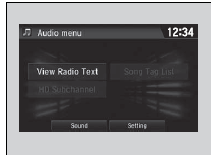
1. Select  .
2. Select Audio.
3. Select  .
4. Select Sound.
Select a tab from the following choices:
- BAS-MID-TRE: Bass, Middle, Treble
- FAD-BAL-SUBW*: Fader, Balance, Subwoofer*
- SVC∙Neural*: Speed Volume Compensation, DTS Neural SurroundTM*
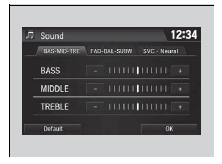
Adjusting the Sound
The SVC has four modes: Off, Low, Mid, and High.
SVC adjusts the volume level based on the vehicle speed. As you go faster, audio volume increases. As you slow down, audio volume decreases
Test yourself
A quick Honda Civic quiz: every answer comes with an explanation and a link to the manual page.
Was this page helpful?