Song By VoiceTM (SBV)
Use SBV to search for and play music from your USB flash drive or iPod using voice commands.
To enable SBV
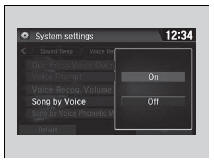
1. Select  .
2. Select Settings.
3. Select System.
4. Select the Voice Recog. tab.
5. Select Song by Voice.
6. Select On or Off.
Song By VoiceTM (SBV)
Setting options:
- On (factory default): Song By VoiceTM commands are available
- Off: Disable the feature.
Searching for music using SBV
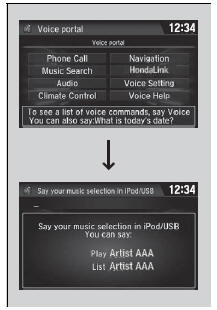
1. Set the Song by Voice setting to On.
2. Press the (Talk) button and say ’Music Search’ to activate the SBV feature for the USB flash drive and iPod.
3. Then, say a next command.
- Example 1: Say ’(List) ’Artist A’’ to view a list of songs by that artist. Select the desired song to start playing.
- Example 2: Say ’Play ’Artist A’’ to start playing songs by that artist
4. To cancel SBV, press the  (hang-up/ back) button on the steering wheel. The selected song continues playing.
Once you have canceled this mode, you need to press the  button and say ’Music Search’ again to re-activate this mode.
Song By VoiceTM Commands List
Song By Voice Commands
NOTE:
Song By VoiceTM commands are available for tracks stored on the USB flash drive or iPod.
You can add phonetic modifications of difficult words so that it is easier for SBV to recognize artists, songs, albums, and composers in voice commands.
Phonetic Modification
SBV is not available when using Apple CarPlay. Use Siri Eyes Free instead.
Phonetic Modification
Add phonetic modifications of difficult or foreign words so that it is easier for SBV to recognize artists, songs, albums, and composers in voice commands when searching for music on the USB flash drive or iPod.
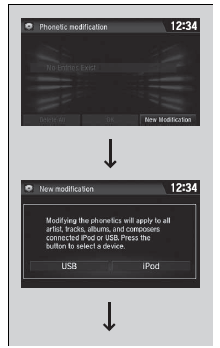
1. Select .
2. Select Settings.
3. Select System.
4. Select the Voice Recog. tab.
5. Select Song by Voice Phonetic Modification.
6. Select New Modification.
7. Select USB or iPod.
Phonetic Modification
Song by Voice Phonetic Modification is grayed out when Song by Voice is set to Off.
You can store up to 2,000 phonetic modification items.

8. Select the item to modify (e.g., Artist).
- The list of the selected item appears on the screen.
9. Select an entry to modify.
- The pop-up menu appears on the screen.
- The listen to the current phonetic modification, select Play.
- To delete the current phonetic modification, select Delete.
10. Select Modify.
11. Select the phonetic spelling you want to use (e.g., ’Artist A’) when prompted.
12. Select OK.
- The artist ’No Name’ is phonetically modified to ’Artist A.’ When in the SBV mode, you can press the
 (Talk) button and use the voice command ’Play ’Artist A’’ to play songs by the artist ’No Name.’
Test yourself
A quick Honda Civic quiz: every answer comes with an explanation and a link to the manual page.