Features
Closing Apps
In this manual: Features
~1min read
You can close specific apps running in the background on the system.
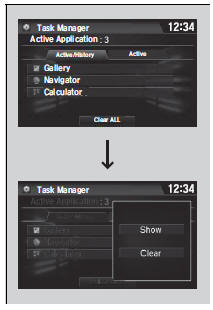
1. Select and hold  .
2. Select the Active tab.
- If you select the Active/History tab, you can close the apps that are currently running and delete the app activity history simultaneously.
3. Select an app you want to close.
4. Select Clear.
- The display will return to the app list.
Closing Apps
If you have a number of apps running in the background and something goes wrong with the audio system, some of those apps may not work properly. If this happens, close all the apps and relaunch the app/apps that you want to use.
To close all apps on the system, select Clear All, then Yes.
You cannot close the HondaLink’ and Garmin* apps.
Test yourself
A quick Honda Civic quiz: every answer comes with an explanation and a link to the manual page.
Was this page helpful?