Apple CarPlay Menu
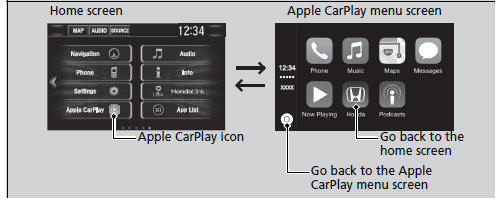
Phone
Access the contact list, make phone calls, or listen to voice mail.
Messages
Check and reply to text messages, or have messages read to you.
Music
Play music stored on your iPhone.
Apple CarPlay
Only iPhone 5 or newer versions with iOS 8.4 or later are compatible with Apple CarPlay.
Park in a safe place before connecting your iPhone to Apple CarPlay and when launching any compatible apps.
To use Apple CarPlay, connect the USB cable to the front USB port. The USB port located in the center console storage will not enable Apple CarPlay operation.
USB Port(s)
To directly access the Apple CarPlay phone function, select Phone on the home screen. While connected to Apple CarPlay, calls are only made through Apple CarPlay. If you want to make a call with HandsFreeLink, turn Apple CarPlay OFF or detach the USB cable from your iPhone.
Setting Up Apple CarPlay
When your iPhone is connected to Apple CarPlay, it is not possible to use the Bluetooth’ Audio or Bluetooth’ HandsFreeLink’. However, other previously paired phones can stream audio via Bluetooth’ while Apple CarPlay is connected.
Phone Setup
For details on countries and regions where Apple CarPlay is available, as well as information pertaining to function, refer to the Apple homepage
Maps
Display Apple CarPlay map and use the navigation function just as you would on your iPhone.
Models with navigation system
Only one navigation system (pre-installed navigation or Apple CarPlay) can give directions at a time. When you are using one system, directions to any prior destination set on the other system will be canceled, and the system you are currently using will direct you to your destination.
Test yourself
A quick Honda Civic quiz: every answer comes with an explanation and a link to the manual page.