Accessories
Audio Unit Removal and Installation (With Premium Audio)
0101B5

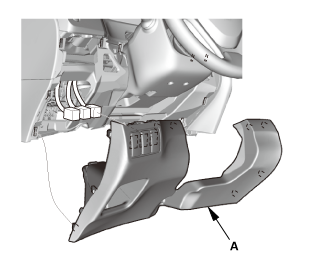
- Driver's Dashboard Lower Cover
 |
|
1. |
Remove the driver's dashboard lower cover (A). |
|
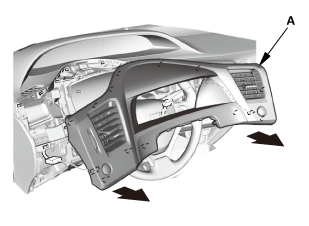
- Dashboard Subdisplay Visor
 |
|
1. |
Remove the dashboard subdisplay visor (A). |
|
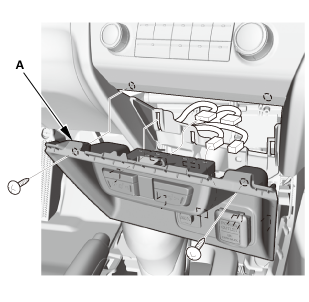
- Center Lower Panel
 |
|
1. |
Remove the center lower panel (A). |
|
NOTE: Take care not to scratch the center console panel or the related parts. |
|
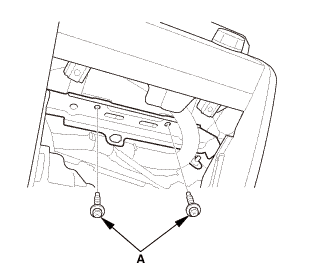
- Audio Unit Assembly
 |
NOTE:
|
 |
Lay a workshop towel under the parts when working on them to protect the face panel from scratches or other damage. |
|
|
|
Do not work in a dusty or dirty place. |
|
|
|
Discharge static electricity from your body before and during the work. |
|
|
|
Do not touch the circuit board(s) with your bare hands. |
|
|
|
Do not work with dirty hands. |
|
|
|
Do not touch the terminal connector of the flat plate cable with your bare hands (If you have touched it, wipe it off thoroughly.). |
|
|
|
Eject the CD before disconnecting the audio unit to prevent damaging the CD player’s load mechanism. |
|
|
|
If you are replacing the audio unit, write down the audio presets (if possible), and enter them into the new audio unit. |
|
|
 |
|
2. |
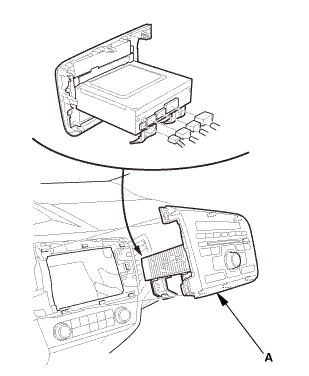
Disconnect the connectors, then pull out the audio unit (A). |
|
- Audio Unit
 |
|
1. |
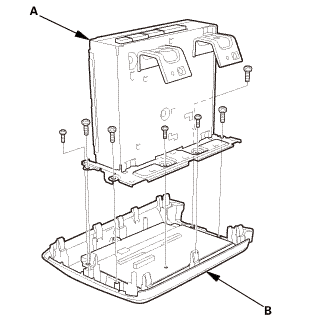
Remove the audio unit (A) from the audio switch panel (B). |
|

- Audio Unit
 |
|
1. |
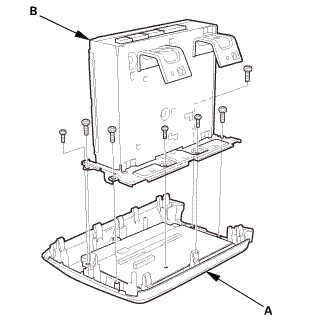
Install the audio switch panel (A) to the audio unit (B). |
|
- Audio Unit Assembly
|
|
1. |
Connect the connectors, then install the audio unit (A). |
|
NOTE: Make sure all the connectors and the antenna lead are securely connected. |
|
 n.amm2.72.7
|
|
2. |
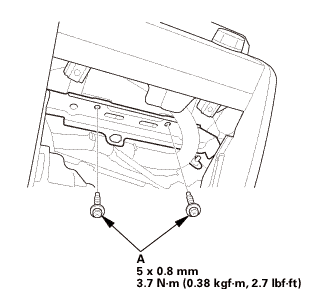
Install the bolts (A). |
|
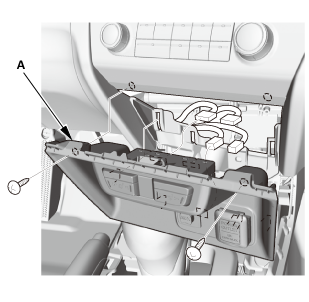
- Center Lower Panel
 |
|
1. |
Install the center lower panel (A). |
|
NOTE: Take care not to scratch the center console panel or the related parts. |
|
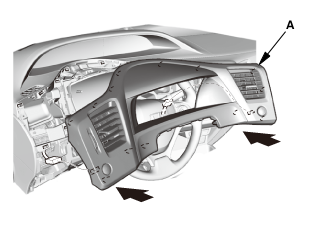
- Dashboard Subdisplay Visor
 |
|
1. |
Install the dashboard subdisplay visor (A). |
|
- Driver's Dashboard Lower Cover
|
|
1. |
Install the driver's dashboard lower cover (A). |
|
?
Test yourself
A quick Honda Civic quiz: every answer comes with an explanation and a link to the manual page.
Was this page helpful?