Features
Automatic Import of Cellular Phonebook and Call History
In this manual: Features
~1min read
When your phone is paired, the contents of its phonebook and call history are automatically imported to HFL.

Automatic Import of Cellular Phonebook and Call History
When you select a person from the list in the cellular phonebook, you can see up to three category icons.The icons indicate what types of numbers are stored for that name.
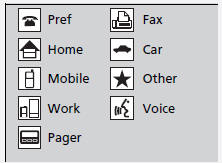
Call history is updated after every connection or call.
Test yourself
A quick Honda Civic quiz: every answer comes with an explanation and a link to the manual page.
Was this page helpful?