Features
Caller's ID Information
In this manual: Features
4steps
~24min
2/5difficulty
Done 0 of 4
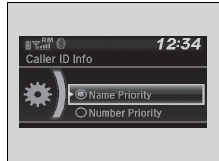
You can select a caller's information to be displayed when you have an incoming call.
- Press the
 button or the
 button.
- Rotate
 to select Phone Setup, then press
 .
- Rotateto select Caller ID Info, then press .
- Rotateto select a mode you want, then press .
Caller's ID Information
Name Priority: A caller's name is displayed if it is stored in the phonebook.Number Priority: A caller's phone number is displayed.
Test yourself
A quick Honda Civic quiz: every answer comes with an explanation and a link to the manual page.
Was this page helpful?