Features
How to Select a Play Mode
In this manual: Features
~1min read
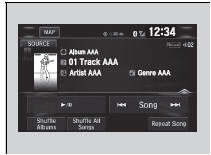
You can select shuffle and repeat modes when playing a file.
Select a play mode.
To turn off a play mode
Select the mode you want to turn off.
How to Select a Play Mode
Play Mode Menu Items Shuffle All Songs: Plays all available files in a selected list (playlists, artists, albums, songs, podcasts, genres, composers, or audiobooks) in random order.
Shuffle Albums: Plays all available albums in a selected list (playlists, artists, albums, songs, podcasts, genres, composers, or audiobooks) in random order.
Repeat Song: Repeats the current track.
Test yourself
A quick Honda Civic quiz: every answer comes with an explanation and a link to the manual page.
Was this page helpful?