Features
Operating Android Auto with Voice Recognition
In this manual: Features
~1min read
Press and hold the talk button to operate Android Auto with your voice.
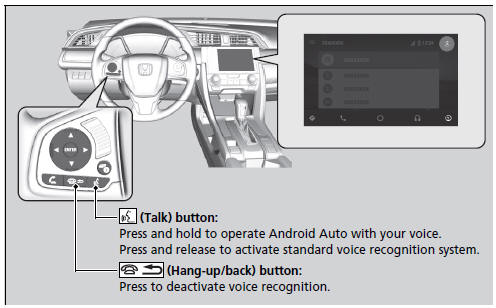
Below are examples of commands you can give with voice recognition:
- Reply to text.
- Call my wife.
- Navigate to Honda.
- Play my music.
- Send a text message to my wife.
- Call flower shop.
For more information, please refer to the Android Auto homepage.
You can also activate the voice recognition function by pressing the  icon in the upper-right corner of the screen.
Test yourself
A quick Honda Civic quiz: every answer comes with an explanation and a link to the manual page.
Was this page helpful?