Features
To Play Bluetooth’ Audio Files
In this manual: Features
~1min read
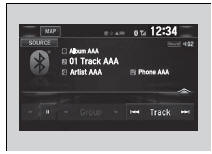
1. Make sure that your phone is paired and connected to the system.
Phone Setup
2. Select the Bluetooth’ Audio mode.
If the phone is not recognized, another HFLcompatible phone, which is not compatible for Bluetooth’ Audio, may already be connected.
To pause or resume a file
Select the play icon or pause icon.
To Play Bluetooth’ Audio Files
To play the audio files, you may need to operate your phone. If so, follow the phone maker’s operating instructions.
Switching to another mode pauses the music playing from your phone.
You can change the connected phone in the Bluetooth’ settings on the Audio menu screen by the following procedure.
1. Select  .
2. Select Setting.
Test yourself
A quick Honda Civic quiz: every answer comes with an explanation and a link to the manual page.
Was this page helpful?