Voice Portal Screen
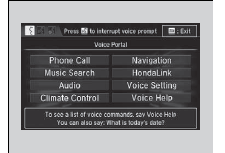
When the (Talk) button is pressed, available voice commands appear on the screen.
For a complete list of commands, say ’Voice Help’ after the beep or select Voice Help.
You can see the list of commands in Voice Info on the Info menu screen. Select Info, then select  .
The system only recognizes the commands on the following pages, at certain screens.
Free form voice commands are not recognized.
Phone Call
This can be only used when the phone is connected. When the system recognizes the Phone call command, the screen will change to the voice recognition screen for phone commands.
- Dial by number
- Call history
- Redial
- Call <Your Contact Name>
- Call <Phone Number>
- Call Police
- Call 911
Phone Call commands are not available if using Apple CarPlay.
Music Search
This can be only used when the iPod or USB device is connected.
Climate Control*1
When the system recognizes the Climate Control command, the screen will change the dedicated screen to the climate control voice recognition screen.
Climate Control Commands
Audio*1
When the system recognizes the Audio command, the screen will change to the audio voice recognition screen.
- Audio On
- Audio Off
- Radio FM
- Radio AM
- Radio SXM*
- Pandora*
- iPod
- USB
- Other Sources
Pandora* cannot be used with Android Auto.
Navigation*1
The screen changes to the navigation screen.
Refer to the Navigation System Manual
HondaLink
This can be only used when the phone is connected
Voice Setting
The screen changes to the Voice Recog tab on the System settings screen.
Voice Help
You can see a list of the available commands on the screen.
- Useful Commands
- Phone Commands
- Audio Commands*1
- On Screen Commands
- Music Search Commands
- General Commands
- Climate Control Commands*1
Useful Commands
The system accepts these commands on the voice portal top screen.
- Call <Phone Number>
- Call <Your Contact Name>
- What time is it’
- What is today’s date’
Phone Commands
The system accepts these commands on the dedicated screen for the voice recognition of the phone.
- Call by Number
- Call by Name
- Call <Phone Number>
- Call <Your Contact Name>
Test yourself
A quick Honda Civic quiz: every answer comes with an explanation and a link to the manual page.