Second generation (2007-2026)
Selecting FM/AM Mode
In this manual: Second generation (2007-2026)
~1min read
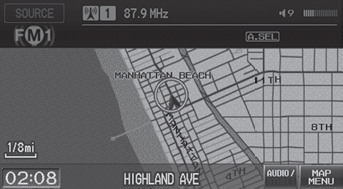
1. Press the FM/AM button. ► Press the FM/AM button again, if necessary, to select the frequency band (FM1, FM2, AM).
► The band and frequency are displayed.
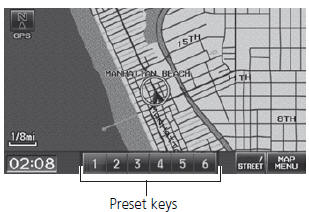
2. Select AUDIO/STREET until AUDIO is highlighted in blue. ► The preset keys are displayed at the bottom of the screen. ► The audio information is displayed at the bottom of the screen. 3. Select the preset key.
► You can also select a station using the SEEK/SKIP button.
Test yourself
A quick Honda Fit quiz: every answer comes with an explanation and a link to the manual page.
Was this page helpful?