Second generation (2007-2026)
Audio Screen Control
In this manual: Second generation (2007-2026)
~1min read
 AUDIO button (in FM/AM mode)
Control the audio system through the navigation screen.
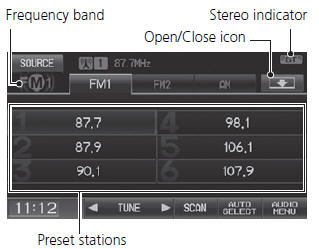
1. Select a frequency band (AM, FM1, or FM2). 2. Select a preset station.
► Touch and hold a preset key until a beep sounds to store the current station in the key.
The following items are available:
• TUNE: Tunes the radio to the frequency you select. Select or
 to select a
frequency. • SCAN: Scans for stations with a strong signal in the current band and plays a 10-second sample. Select Stop to stop scanning and play the current selection. • AUTO SELECT: Scans and automatically stores up to six AM stations and 12 FM stations with a strong signal in the preset buttons. • AUDIO MENU: Sets the RDS options and sound preferences. • SOURCE: Changes the source mode. • Open/Close icon
: Displays/hides the detailed information.
The A.SEL indicator comes on the display when AUTO SELECT is on. If you do not like the stations Auto Select has stored, you can change the frequencies stored in the preset buttons manually.
Test yourself
A quick Honda Fit quiz: every answer comes with an explanation and a link to the manual page.
Was this page helpful?