Body Electrical System
Description and Operation
In this manual: Body Electrical System
5steps
~30min
2/5difficulty
Done 0 of 5
Description
AVN System: The AVN system improves information search and driver convenience by simplifying system operation and unifying the display of user information such as multimedia, air conditioning and vehicle information. The system mainly consists of a keypad for combined function operation, 8-inch LCD monitors with a wide viewing angle for the front seats, an AVN head unit with Bluetooth hands-free and voice recognition and navigation, a music amplifier for the rear seats, and a multimedia unit that connects to other external devices.- Simplified User Interface: Multimedia, air conditioning and vehicle information are displayed on the monitor and controlled from the front keypad.
- Networked Electronic Components: Efficient information transmission via CAN bus
- Integrated Advanced Technologies:
A. Voice Recognition: This function recognizes the user's voice commands to control the system. The user can give voice commands to control the AV system, Bluetooth phone and navigation, and connect to the Blue Link call center (USA only). B. Bluetooth Hands-Free: This complies with international wireless communication standards and uses Bluetooth technology, which is adopted in most mobile phones currently on the market. Once paired, it automatically connects to the driver's mobile phone whenever the driver gets into the vehicle. C. USB Connection: Portable music players, such as a USB memory stick or Walkman, can be connected and played through the vehicle speakers. 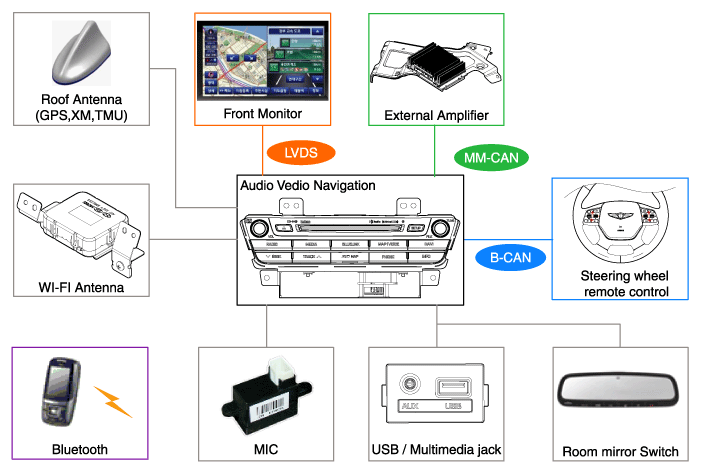
- AVM: Around View Monitor System
- LVDS: Low Voltage Differential Signaling
- B-CAN: Body Controller Network
- MM-CAN: Multimedia Controller Local Network
- Tunnels
- Underground parking structures
- Under elevated roads
- Roads through forested areas
- Areas near high-rise buildings
- Canyon roads
- If multipath errors occur due to reflections from buildings or similar causes, the current position mark on the navigation screen may differ from the actual vehicle position.
- The vehicle position on the navigation system may differ from the actual position if the vehicle is under the influence of... Driving for a short period will allow the vehicle position to be corrected through map matching or GPS information (in some cases it may take several minutes).
A. When driving on a narrow-angle Y-intersection road, the current position may be displayed in the opposite direction. B. If the vehicle is being transported on a car carrier, the current position mark may stop at the last position before loading. C. When driving on a spiral road. D. When driving in mountainous areas with sharp curves or sudden braking. E. When exiting a parking structure, a building parking structure, or a turntable with many turns. F. When tires have been recently replaced (especially when using spare or non-studded tires). G. If the battery terminal has been disconnected. H. When driving on city streets, the current position may be displayed on the opposite side of the road or in an off-road position. I. When the zoom level is changed from the maximum zoom level to another zoom level, the current position mark may be displayed on a different road. J. When driving in heavy traffic with frequent stops in traffic jams or at intersections. K. When driving on slippery roads, such as deep sand, snow, etc. L. When driving with snow chains installed. M. When using tires of an incorrect size. N. When the tire pressure differs between the four tires. O. When the replacement tire is worn or used (especially non-studded tires used for a second season, etc.). P. When driving near high-rise buildings. Q. If a roof rack is installed. R. When driving at high speed or when calculating a long-distance route.
- On a straight road, a straight-ahead instruction may be given.
- Guidance may not be given even when turning at an intersection.
- There are certain intersections where guidance may not be provided.
- Route guidance may indicate entry into a restricted area (restricted zone, road under construction, etc.).
- Guidance may be given to a position far from the actual destination if roads leading to the actual destination do not exist or are too narrow.
- Incorrect voice guidance may be given if the vehicle deviates from the planned route (for example, if a turn is made at an intersection while navigation guides you straight ahead).
- Map data may be missing or incorrect, which may make route guidance impossible.
- When turning at an intersection, the navigation system provides incorrect current location information.
- Route recalculation may take longer when driving at high speed.
- A route guidance signal to make a U-turn may appear at a location where U-turns are prohibited.
- A route guidance signal indicating entry into a restricted area (restricted zone, road under construction, etc.) may occur.
- Guidance may be given for positions far from the actual destination that do not exist or are too narrow.
- Incorrect voice guidance may be given if the vehicle deviates from the planned route (for example, if a turn is made at an intersection while navigation guides you straight ahead).
Test yourself
A quick Hyundai Genesis DH quiz: every answer comes with an explanation and a link to the manual page.
Was this page helpful?