When removing with a flat-blade screwdriver or removal tool, wrap the tools with protective tape to prevent damage to components.
When removing interior trim components, use a plastic panel removal tool to avoid damaging the surface.
Be careful not to bend or scratch the trim and panels.
Remove the rear seatback assembly. (Refer to Rear Seat - "Rear Seat Assembly")
Remove the belt guide cover (A) located on the inside of the rear seat.
? How to Remove the Outer Hook
Release the hook by pressing the front (A) and rear (B) grooves until you hear a click, using an awl or pin.
Press the release button (B) and remove the rear seat headrest (A).
Loosen the mounting screws, then remove the belt guide cover (A) on the outside of the rear seat.
? How to Remove the Inner HookRelease the hook by pressing the part (A) until you hear a click, using an awl or pin.Align the pin with the semicircular hole (A) on the lower guide.Remove the inner cover by inserting a pin and lightly pressing the rear seat cushion pad in the direction indicated by the arrow.
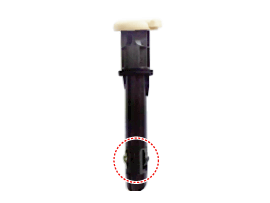
Pull out the rear seat headrest guides (A) by squeezing both sides of the lower part of the guides, and remove them.
How to Remove the Headrest Guide
Rotate the headrest guide to pull it out.
Be careful not to damage the steel clip (B).
Disconnect the rear sunshade switch connector (A). (Refer to Body Electrical System - "Rear Sunshade Switch")
Remove the wiring harness clamps (A).
Loosen the mounting bolts and nuts, then remove the rear armrest (A).
Tightening torque: 19.6 - 29 N·m
After removing the clips on the rear of the seatback, remove the rear seatback trim cover (A). [Rear side][Front side]
Install in the reverse order of removal.
Remove the ring clips (A) inside the rear seat cushion cover, then remove the rear seat cushion cover (B).
Replace the ring clips with new ones using the special service tool (C) (09880-4F000).
?
Test yourself
A quick Hyundai Genesis DH quiz: every answer comes with an explanation and a link to the manual page.


 Release the hook by pressing the part (A) until you hear a click, using an awl or pin.

 Align the pin with the semicircular hole (A) on the lower guide.

 Remove the inner cover by inserting a pin and lightly pressing the rear seat cushion pad in the direction indicated by the arrow.