Rearview Camera
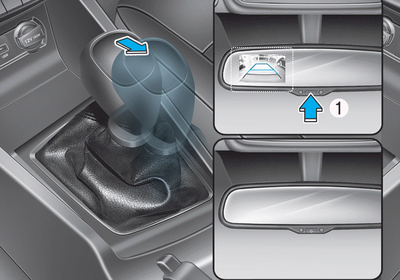
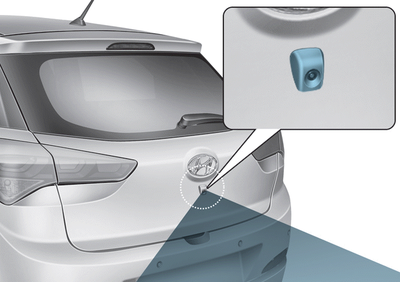
The rear view camera is activated when the ignition key is in the ON position and the shift lever is in the R (Reverse) position.
Each time the vehicle ignition is turned off and then back on, the rear view camera activates when the shift lever is moved to the R (Reverse) position. (to ensure reverse)
The rear view camera can be turned off by pressing the ON/OFF button (1) when the rear view camera is turned on. Press the ON/OFF button (1) once more to turn the rear view camera back on with the engine running and the shift lever in the R (Reverse) position.
 WARNING
- Never rely only on the rear view camera while driving or backing up.
- Always perform a visual check to make sure nothing is blocking the vehicle before moving in any direction to avoid a collision.
- Always use extreme caution when driving near objects on the road, especially pedestrians and, in particular, children.
 NOTICE
The camera lens must always be kept clean. The camera will not function normally if the lens is contaminated with foreign material.
Test yourself
A quick Hyundai i20 quiz: every answer comes with an explanation and a link to the manual page.