Driver's Position Memory System
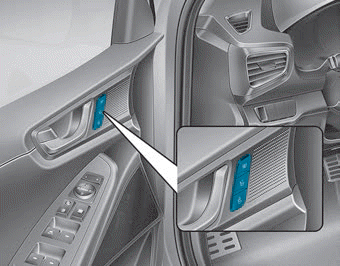
The Driver's Position Memory System is used to store and recall the following memory settings by simply pressing a button.
- Driver's seat position
- Outside rearview mirror position
- Instrument panel illumination brightness
If the battery is disconnected, the position memory will be lost and the positions must be stored in the system again.
If the Driver's Position Memory System does not operate normally, have it checked by an authorized HYUNDAI dealer.
WARNING
Never attempt to operate the Driver's Position Memory System while the vehicle is moving.
This may result in loss of vehicle control and an accident, which could cause death, serious injury, or property damage.
Storing Memory Positions
1. Make sure the shift lever is in P (Park) when the ENGINE START/STOP button is in the ON position.
2. Adjust the driver's seat position, side mirror position and instrument panel brightness to the positions that are comfortable for the driver.
3. Press the SET button. The system will beep once and the LCD will display "Press the button to save settings."
4. Press one of the memory buttons (1 or 2) within 4 seconds. The system will beep twice when the memory is successfully stored.
5. The LCD display will show the message "Driver 1 (or 2) settings saved."
Recalling Memory Positions
1. Make sure the shift lever is in P (Park) when the ENGINE START/STOP button is in the ON position.
2. Press the desired memory button (1 or 2). The system will sound one beep, and then the driver's seat position, outside mirror positions, and instrument panel illumination brightness will automatically adjust to the stored positions.
3. The LCD display will show the message "Driver 1 (or 2) settings applied."
NOTICE
- While recalling memory position "1", pressing the SET or 2 button temporarily stops the adjustment of the recalled memory position. Pressing the 2 button recalls memory position "2".
- While recalling memory position "2", pressing the SET or 1 button temporarily stops the adjustment of the recalled memory position. Pressing the 1 button recalls memory position "1".
- When recalling stored positions, pressing any of the control buttons for the driver's seat, outside mirrors, or instrument panel illumination will stop the movement of that component and move it in the direction of the pressed control button.
Test yourself
A quick Hyundai Ioniq quiz: every answer comes with an explanation and a link to the manual page.