Brake System
Rear Wheel Speed Sensor Repair Procedures
In this manual: Brake System
16steps
~96min
4/5difficulty
Done 0 of 16
Removal
[Torsion Beam Axle Type]- Turn the ignition switch OFF, then disconnect the negative (-) battery cable.
- Loosen the wheel nuts slightly. Raise the vehicle and make sure it is securely supported.
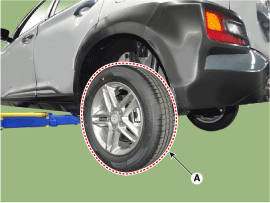
- Remove the rear wheel and tire (A) from the rear hub.
Tightening torque: 107.9–128 N·m
- Remove the rear brake caliper. (Refer to Brake System - "Rear Disc Brake")
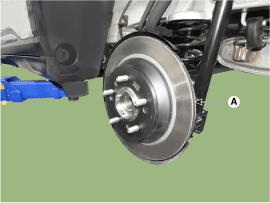
- Remove the rear brake disc (A) after loosening the screw.
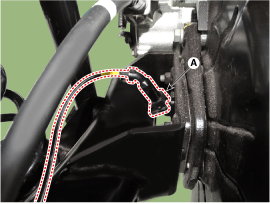
- Disconnect the rear wheel speed sensor connector (A).
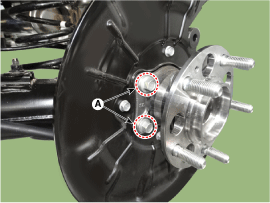
- Loosen the bolts (A) and remove the hub bearing.
Tightening Torque: 49.0–59 N·m
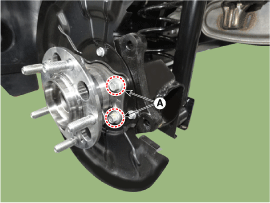
- Turn the ignition switch OFF, then disconnect the negative (-) battery cable.
- Loosen the wheel nuts slightly. Raise the vehicle and make sure it is securely supported.
- Remove the rear wheel and tire (A) from the rear hub.
Tightening torque: 107.9–128 N·m
- Remove the luggage compartment side trim. (Refer to Body - "Luggage Compartment Side Trim")
- Disconnect the rear wheel speed sensor connector (A).
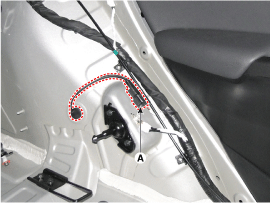
- Remove the rear wheel speed sensor cable bracket mounting bolt (A), (B). Tightening torque: (A) 7.8–11.7 N·m (B) 6.8–10.7 N·m
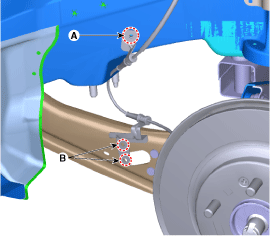
- Remove the rear wheel speed sensor after loosening the mounting bolt (A).
Tightening torque: 6.8–10.7 N·m
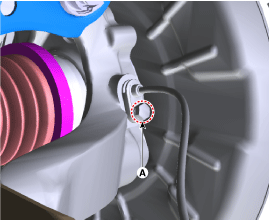
Installation
- To install, reverse the removal procedure.
Inspection
- Measure the output voltage between the wheel speed sensor terminal and body ground.
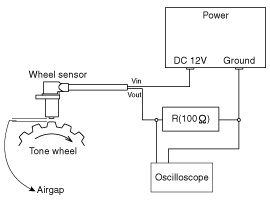
- Compare the change in the wheel speed sensor output voltage with the normal output voltage change, as shown below.
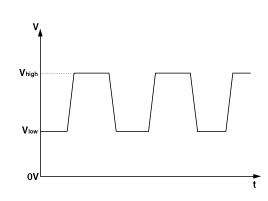
V_low: 0.59–0.84 V V_high: 1.18–1.68 V Frequency range: 1–2,000 Hz
Test yourself
A quick Hyundai Kona quiz: every answer comes with an explanation and a link to the manual page.
Was this page helpful?