Blind-Spot View Monitor (BVM)
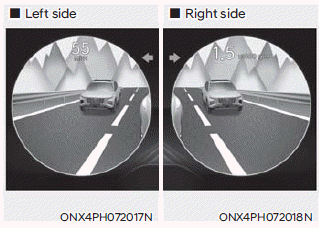
The Blind-Spot Monitor uses the wide-angle side view cameras to display the rear blind-spot area of your vehicle on the instrument cluster when the turn signal is turned on.
Information
Refer to the "Driver Assistance Sensors" section in this chapter for locations and general precautions of the side view cameras.
Blind-Spot View Monitor Settings
Blind-Spot View
With the ignition ON, go to Settings > Vehicle > Driver Assistance > Blind-Spot Safety > Blind-Spot View (for infotainment system) from the Settings menu to turn the Blind-Spot View Monitor on or off.
Blind-Spot Monitor Operation
The system turns on when:
The left or right turn signal lever is operated and the corresponding side view camera image appears on the instrument cluster.
The system turns off when:
- The turn signal is turned off, and the image on the instrument cluster turns off.
- The hazard warning lights are on. The Blind-Spot Monitor turns off regardless of the turn signal status.
- Other warnings on the instrument cluster may replace the side view camera image when changing lanes.
Blind-Spot Monitor Malfunction
If the Blind-Spot Monitor is malfunctioning, have the system inspected by an authorized HYUNDAI dealer.
WARNING
- Always turn your head and look to determine whether there is enough distance to change lanes. The distance to the other vehicle shown on the instrument cluster may differ from the actual distance.
- Always keep the side view camera lenses clean. If the lens is blocked or covered, the Blind-Spot Monitor may not operate properly. Do not clean with strong chemicals containing high alkaline or volatile organic solvents (e.g., gasoline, acetone).
Test yourself
A quick Hyundai Tucson LM quiz: every answer comes with an explanation and a link to the manual page.