Cruise Control Operation
To set the cruise speed
1. Accelerate to the desired speed, which must be above 20 mph (30 km/h).
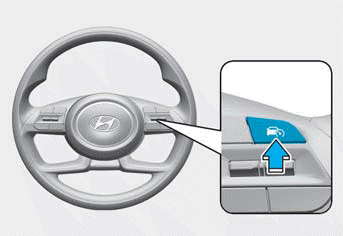
2. Press the Driving Assist button ( ) at the desired speed. The set speed and Cruise (
 ) indicator illuminates on the instrument cluster.
3. Release the accelerator pedal. The vehicle maintains the set speed even when the accelerator pedal is not depressed.
Information
Vehicle speed may decrease or increase when driving up or down a slope.
To increase the set speed
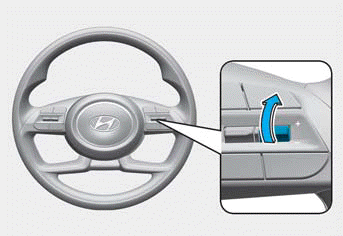
- Press the + switch up and release it immediately to increase the set speed by 1 mph (1 km/h).
- Press and hold the + switch to increase to the nearest multiple of 10 km/h first, then increase by 10 km/h each time.
For temporary acceleration
If you want to accelerate temporarily while cruise control is on, press the accelerator pedal.
To return to the set speed, release the accelerator pedal.
If you press the + switch up or the - switch down at a higher speed, the cruise control will set a higher speed.
To decrease the set speed
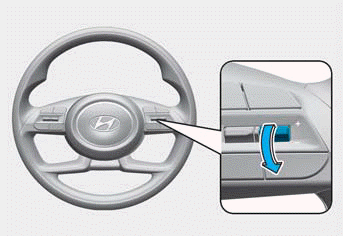
- Press the - switch down and release it immediately to decrease the set cruise speed by 1 mph (1 km/h).
- Press and hold the - switch down to decrease to the nearest multiple of 10 km/h first, then decrease by 5 mph (10 km/h) each time.
WARNING
If you need to reduce speed quickly to avoid a collision, press the brake pedal as needed.
Temporary Cancellation of Cruise Control
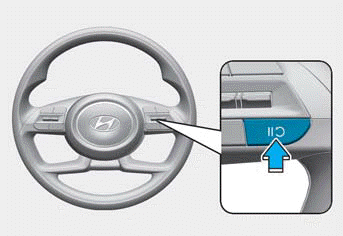
Cruise control is canceled when:
- Depressing the brake pedal
- Press
 button
- Shifting the transmission to N (Neutral)
- Reducing your vehicle speed below approximately 20 mph (30 km/h)
- Accelerating the vehicle above 115 mph (185 km/h)
- ESC (Electronic Stability Control) operating
- Shifting to 2nd gear in manual shift mode
The set speed is cancelled, but the Cruise ( ) indicator will remain illuminated.
NOTICE
If cruise control is cancelled in a situation not listed above, have the vehicle inspected by an authorized HYUNDAI dealer.
To resume cruise control
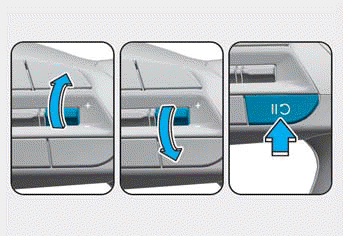
- Press the +/- switch orbutton. If you press the +/- switch up or down, the vehicle speed is set to the current speed shown on the instrument cluster.
- If you press thebutton, your vehicle speed returns to the previously set speed.
- Your vehicle speed must be above 30 km/h for the resume function to operate.
WARNING
Your vehicle speed may increase or decrease rapidly when pressing the button.
To Turn Off the Cruise Control
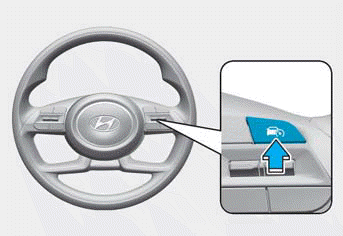
Press the Driving Assist button () button to turn off cruise control. Cruise () indicator turns off.
Always press the Driving Assist button () to turn off cruise control when it is not in use.
Information
If your vehicle is equipped with Manual Speed Limit Assist, press and hold the Driving Assist button to turn off cruise control and turn on Manual Speed Limit Assist.
WARNING
To avoid serious injury or death:
- Keep cruise control off when not in use to avoid unintentionally setting a speed. Make sure the cruise control ( ) indicator is off.
- Always drive defensively and pay attention to the driving task.
- Set your vehicle speed to the speed limit on the road and use the appropriate unit (mph or km/h) for your country.
- Do not use cruise control when it may be unsafe to maintain a constant speed, including when driving:
- in heavy traffic or in conditions where traffic is heavy or congested and it is difficult to maintain a constant speed
- on slippery, icy, or snow-covered roads
- on hilly or windy roads
- with limited visibility, such as in fog, snow, rain, or sandstorms - Do not use cruise control when towing a trailer.
Test yourself
A quick Hyundai Tucson LM quiz: every answer comes with an explanation and a link to the manual page.