Radio Mode
Main Mode Screen
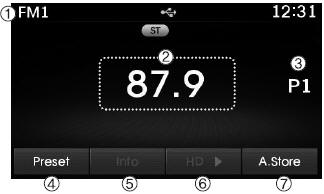
1. Mode Display: Shows the current operating mode.
2. Frequency: Shows the current frequency.
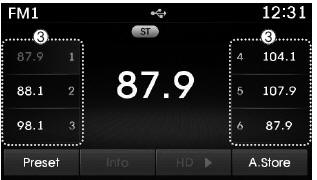
3. Preset: Shows the current preset number [1] ~ [6].
4. Preset Display: Shows the preset buttons.
5. Information: Shows broadcast information.
6. A.STORE: Automatically stores the frequencies with the best reception to the Preset buttons.
Switching to Radio Mode
Press key changes the operating mode in the order FM1 ➟ FM2 ➟ AM ➟ XM1 ➟ XM2 ➟ XM3.
If [Mode Pop-up] is turned on in the
 [Display] setting, pressing the
 key will display the Radio mode pop-up screen.
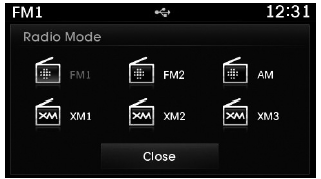
Turn Turn the TUNE knob to move the focus. Press the knob to select.
Radio Frequency Seek
Using Seek
press key to play the previous/next frequency.
Using TUNE
Turn Turn the TUNE knob to select the desired frequency.
- FM: Increases/decreases by 200 kHz
- AM: Increases/decreases by 10 kHz
Using Radio Mode
Selecting Presets / Storing Presets
press button to display the frequency information stored for each button.
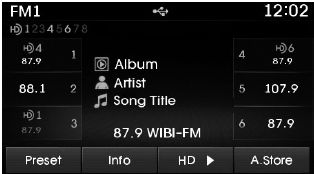
press ~
 buttons to play the desired preset.
✽ NOTICE
While listening to the frequency you want to store as a preset, press and hold one of the  ~
 preset buttons (more than 0.8 seconds) to store the current frequency in the selected preset.
Auto Store
Press the button to automatically store the received frequencies to the Preset buttons.
✽ NOTICE
While Auto Store is operating, pressing the [Cancel] button again will cancel the storing. The previous frequency will be restored.
Scan
press key to preview the frequencies with the best reception for 5 seconds each.
Press and hold the key (more than 0.8 seconds) to preview the presets for 5 seconds each.
After scanning is complete, the previous frequency will be restored.
While scanning, pressing the key cancels the scan operation.
Test yourself
A quick Hyundai Tucson LM quiz: every answer comes with an explanation and a link to the manual page.