Multimedia System
Steering Wheel Remote Control
In this manual: Multimedia System
~1min read
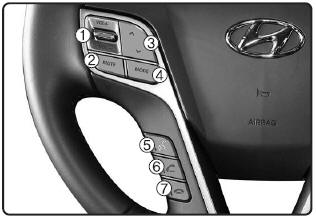
1. VOLUME: Used to adjust the volume.
2. MUTE: Mutes the sound.
3. SEEK
- Short press (less than 0.8 seconds): Radio mode: Seeks a broadcast frequency or a preset station. Media (CD / USB / iPod® / My Music / BT Audio) modes: Changes the track, file, or chapter.
- Press and hold (more than 0.8 seconds): Radio mode: Automatically seeks frequencies and broadcast channels. Media modes (CD/USB/iPod®/My Music): Rewinds or fast-forwards the track or song (file). BT Audio mode may not be supported on some mobile phones.
4. MODE
- Each time this key is pressed, the mode changes in the following order: FM1➟FM2➟AM➟XM1➟XM2➟XM3➟CD➟USB or iPod➟AUX➟My Music➟BT Audio
- If a storage device is not connected or a disc is not inserted, the corresponding modes will be disabled.
5. 
- Short press: Starts voice recognition. When pressed during a voice prompt, stops the prompt and enters the voice command standby state.
- Press and hold (more than 0.8 seconds): Ends voice recognition.
6. 
- Short press: When pressed on the phone screen, displays the call history screen. When pressed on the dial screen, places the call. When pressed on the incoming call screen, answers the call. When pressed while on hold, switches to call waiting.
- Press and hold (more than 0.8 seconds): When pressed in Bluetooth® Wireless Technology Handsfree standby mode, redials the last call. When pressed during a Bluetooth® Wireless Technology Handsfree call, transfers the call back to the mobile phone (private). When pressed during a mobile phone call, transfers the call to Bluetooth® Wireless Technology Handsfree (works only when Bluetooth® Wireless Technology Handsfree is connected).
7. 
Ending a phone call
Test yourself
A quick Hyundai Tucson LM quiz: every answer comes with an explanation and a link to the manual page.
Was this page helpful?