Convenient Features of Your Vehicle
Unlocking
In this manual: Convenient Features of Your Vehicle
~1min read
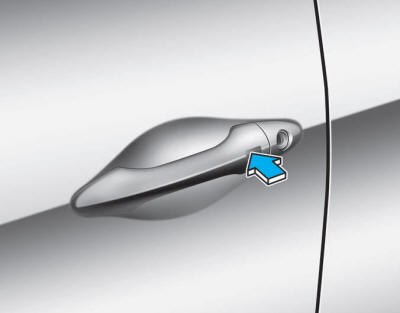
To unlock:
1. Carry the Smart Key.
2. Either press the door handle button or press the door unlock button (2) on the smart key.
3. The driver's door will unlock. The hazard warning lights will flash twice.
✽ NOTICE
- The door handle button will only work when the Smart Key is inside 28~40 in. (0.7~1 m) of the outside door handle. Other people may also open the doors without the Smart Key.
- If you press the door unlock button again within four seconds, all doors will unlock.
- After the doors are unlocked, they will automatically lock again after 30 seconds if no door is opened.
- You can change the system to the central door unlock mode (all doors unlock with one press of the unlock button). If you want this function, perform the following:
Changing the Unlock Mode (Two-Step Unlock Mode ↔ Central Door Unlock Mode)
The unlock mode alternates each time the lock and unlock buttons on the smart key are pressed simultaneously for 4 seconds or more. The hazard warning lights flash four times to indicate the mode change is complete.
Test yourself
A quick Hyundai Tucson LM quiz: every answer comes with an explanation and a link to the manual page.
Was this page helpful?