XM Radio
Using XM Satellite™ Radio
Your vehicle comes with a 3-month complimentary XM Satellite™ Radio subscription. XM provides access to over 130 channels of music, information and entertainment programming.
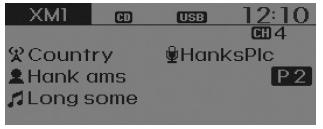
Seek
press key
- Short press of the key: Selects the previous or next channel.
- Press and hold the key (more than 0.8 seconds): Continuously moves to the previous or next channel.
❈ If the "Category" icon is displayed, channels are changed within the current category.
Scan
press key
Short press of the key: Previews each broadcast for 5 seconds each
❈ Press the key again to continue listening to the current frequency
❈ If the "Category" icon is displayed, channels are changed within the current category.
Category
press /
 key
 Set using the
 SETUP knob
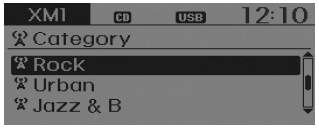
- The category list is displayed. Highlight the category to which the current channel belongs.
- In category list mode, press the
 /
 key to navigate the category list.
- Press the TUNE knob to select the lowest channel in the highlighted category.
❈ If a channel is selected by choosing a category, the "CATEGORY" icon is displayed at the top of the screen.
Preset
press ~
 key
- Short press of the key: Plays the frequency stored on the corresponding key.
- Press and hold the key (more than 0.8 seconds): Press and hold the desired key from
 ~
 to store the current broadcast on the selected key. A beep will sound.
melody
- Turn
 TUNE knob: Changes the channel number or scrolls the category list.
- Press
 TUNE knob: Selects a menu.
Menu
Select the category menu using the SETUP knob
 press
 key
 Select [
 Info] through
 the TUNE knob or
 key
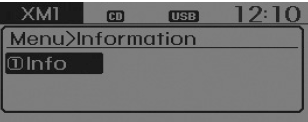
Info (Information)
Displays the artist/song information for the current song.
Test yourself
A quick Hyundai Tucson LM quiz: every answer comes with an explanation and a link to the manual page.