Electrical System
Alternator Rotor Removal
In this manual: Electrical System
~1min read
- Remove the alternator cover (see Alternator Cover Removal).
- Clean off the oil from the outer circumference of the rotor.
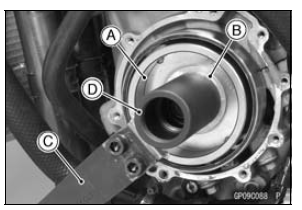
- Hold the alternator rotor steady with the rotor holder [A] and suitable washer or plate [B].
Special Tools - Grip [C]: 57001-1591 Rotor Holder: 57001-1666 Flywheel Puller Assembly, M38 × 1.5/M35 × 1.5 [D]: 57001-1405 Rotor Holder Attachment: 57001-1689
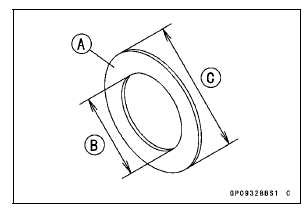
Suitable Washer [A] (Aluminum) Inside Diameter [B]: 40 mm (1.6 in.) Outside Diameter [C]: 60 mm (2.4 in.) Thickness: About 2 mm (0.08 in.)
- Remove the rotor bolt and washer.
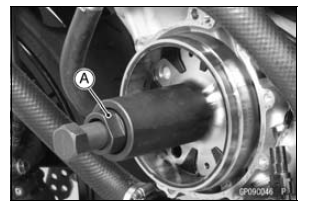
- Using the flywheel puller [A], remove the alternator rotor from the crankshaft.
Special Tool - Flywheel Puller Assembly, M38 × 1.5/M35 × 1.5: 57001-1405
NOTICE
Do not attempt to strike the alternator rotor itself.
Striking the rotor can cause the magnets to lose their magnetism.
Test yourself
A quick Kawasaki Ninja ZX-10R quiz: every answer comes with an explanation and a link to the manual page.
Was this page helpful?