Audio system
Bluetooth® (BT) Audio
In this manual: Audio system
~2min read
✽ NOTICE - Using Bluetooth® (BT) Audio
- Bluetooth® Audio mode can only be used if a Bluetooth®-enabled phone is connected. Only devices that support Bluetooth® audio can be used.
- If the Bluetooth®-enabled phone is disconnected during play, the music stops.
- When the TRACK UP/DOWN buttons are used during Bluetooth® audio streaming, a popping noise or sound interruptions may occur, depending on the cell phone device.
- Depending on the cell phone model, the audio streaming function may not be supported.
- If a phone call is made or received when music is playing in Bluetooth® Audio mode, the call may mix with the music.
- When returning to Bluetooth® Audio mode after ending a call, play might not resume automatically for some cell phone models.
CAUTION
- Bluetooth®Wireless Technology Handsfree is a feature that enables drivers to practice safe driving. Connecting the car audio system with a Bluetooth®Wireless Technology phone allows the user to conveniently make calls, receive calls, and manage the phone book. Before using the Bluetooth® Wireless Technology, carefully read the contents of this user’s manual.
- Excessive use or operations while driving may lead to negligent driving practices and be the cause of accidents.
- Do not operate the device excessively while driving.
- Viewing the screen for prolonged periods of time is dangerous and may lead to accidents.
- When driving, view the screen only for short periods of time.
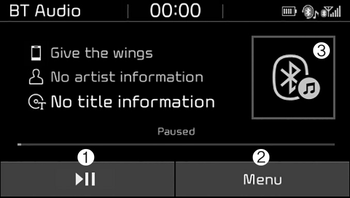
(1) Play/Pause
Pause or play music.
(2) Menu
Navigate to the menu screen.
(3) Album Image
View song info.
✽ NOTICE
- Some cell phone models may not support particular functions.
- Bluetooth® audio volume is synced with cell phone media volume.
Playback
• Press the [MEDIA] button, and select [BT Audio].
Changing songs
• Press the [SEEK/TRACK] button to play the previous or next song.
✽ NOTICE
Some cell phones may not support this function.
Menu
Press the [Menu], and select the desired function.
- Connections: The currently connected Bluetooth® device can be changed.
- Information: Detailed information on the currently playing song is displayed.
- Sound settings: Audio sound settings can be changed.
Was this page helpful?