My Music
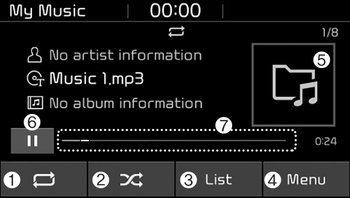
(1) Repeat
Enable/disable repeat.
(2) Shuffle
Enable/disable shuffle play.
(3) List
View a list of all songs.
(4) Menu
Navigate to the menu screen.
(5) Album Image
View song info.
(6) Pause
Pause or play music.
(7) Playback progress
Press to skip to the desired location.
Playback
Press the [MEDIA] button, and select [My Music].
- My Music cannot be selected if it does not contain music.
- Check the content of your USB drive before saving music to My Music.
Changing songs
Press the [SEEK/TRACK] button to play the previous or next song.
- Press and hold the [SEEK/ TRACK] button to rewind or fast forward the currently playing song.
- Search songs by turning the TUNE knob and press the knob to play.
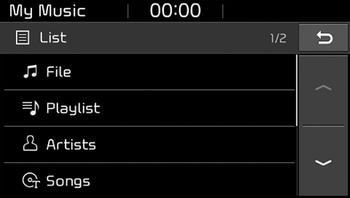
Selecting songs from a list
Press the [List] to see a list of songs available for play.
Select and play the desired song.
Repeat play
Press the [Repeat] to enable or disable ‘Repeat all’ or ‘Repeat current song’.
 Repeat all: All songs in the playlist are repeated.
 Repeat current song: The currently playing song is repeated.
Shuffle play
Press the [Shuffle] to enable/disable ‘Shuffle’ play.
 Shuffle: Songs are played in random order.
Menu
Press the [Menu], and select the desired function.

- Delete files: You can delete files from My Music.
(1) File: Select saved file.
(2) Mark all(Mark All): Select all files.
(3) Unmark all(Unmark All): Deselect all files.
(4) Delete: Delete the selected file(s).
- Select the file to delete, then press the [Delete] to delete it.
- Delete is canceled if voice recognition is activated or phone calls are received or made during delete. - Add to playlist(Add to Playlist): Frequently played songs can be paired in a [Playlist].
- Songs can be played from the [Playlist]. - Information: Detailed info on the currently playing song is displayed.
- Sound Settings: Audio sound settings can be changed.
- Scan: All songs are played for 10 seconds each.
Delete from playlist(Delete from Playlist)
When a song in the playlist is playing, press the [Menu] and select [Delete from playlist(Delete from Playlist)].
Select the song to delete, then press [Delete].