LCD Modes (for instrument cluster type C)
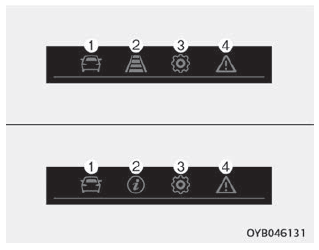
1. Trip Mode
This mode displays driving information such as Odometer, Fuel Economy, etc. For more details, refer to "Trip Computer" on page 4-59.
2. Assist Mode
- : This mode displays the status of the following functions.
- Lane Keeping Assist (LKA)
- Driver Attention Warning (DAW)
- Blind-Spot Collision Warning (BCW)
- : This mode displays the status of the Blind-Spot Collision Warning (BCW).
3. User Settings Mode
In this mode, you can change the settings of the doors, lamps, etc.
4. Main Warning Mode
This mode provides warning messages related to a TPMS malfunction, low tire pressure (if equipped), low engine oil level, or a malfunction of the Forward Collision-Avoidance Assist (FCA, if equipped) or Blind-Spot Collision Warning (BCW, if equipped) system.
❈ To control the LCD modes, refer to "LCD Display Control" on page 4-52.
Test yourself
A quick Kia Stonic quiz: every answer comes with an explanation and a link to the manual page.