key functions
Folding key
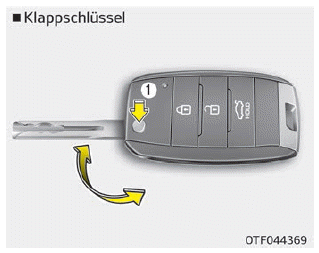
To unfold the key, press the release button; the key then unfolds automatically. To fold the key, hold the release button and fold the key manually.
WARNING
Do not fold the key without holding the release button. This could damage the key.
Smart Key
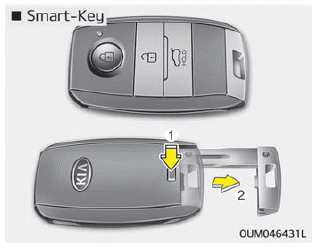
To remove the mechanical key, press and hold the release button and pull the mechanical key out.
To reinsert the mechanical key, slide the key into the slot and press it until you hear a click.
WARNING
Ignition key (smart key)
It is dangerous to leave children unattended in the vehicle with the ignition key (smart key), even if the key is not in the ignition and the start switch is in the ACC or ON position.
Children imitate adults and could insert the key into the ignition lock or press the start button. The ignition key (smart key) would allow children to operate the power windows or other controls, or even set the vehicle in motion, which could result in serious injury or death. Never leave your keys in the vehicle with children unattended while the engine is running.
WARNING
Use replacement parts from a Kia dealer/service partner. When a key from the aftermarket is used, the ignition switch may not automatically return from the START position to the ON position. If this happens, the starter motor continues to run, which may damage the starter motor. Additionally, there is a risk of fire due to overloading of the wiring.
Test yourself
A quick Kia Stonic quiz: every answer comes with an explanation and a link to the manual page.