Hole Cover Removal/Installation
1. Disconnect the negative battery cable..
2. Remove the following parts:
a. Upper column cover.
b. Instrument cluster.
c. Center panel.
d. Center cover.
e. Dashboard upper panel.
f. Multi information display.
3. Pull the hole cover in the direction of arrow (1), (2) shown in the figure, while remove the clip A, hook B and clips C.
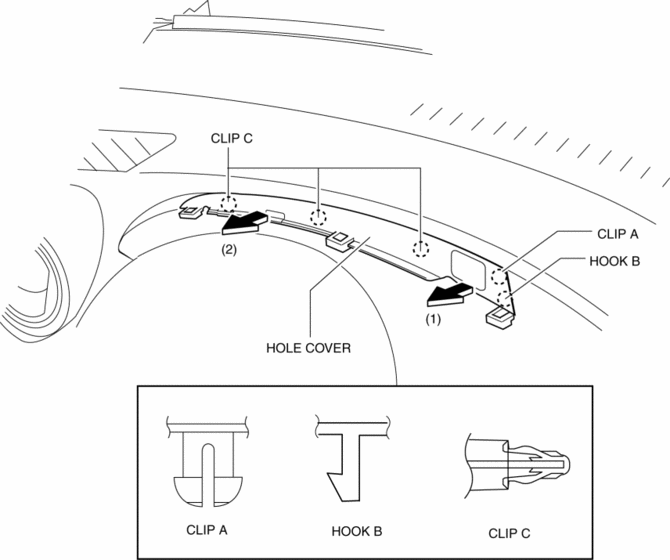
4. Remove the hole cover.
5. Install in the order of removal.
Without Car-navigation system1. Disconnect the negative battery cable..
2. Remove the following parts:
a. Upper column cover.
b. Instrument cluster.
c. Center panel.
d. Center cover.
e. Dashboard upper panel.
3. Pull the hole cover in the direction of arrow (1), (2) shown in the figure, while remove the hook and clips.
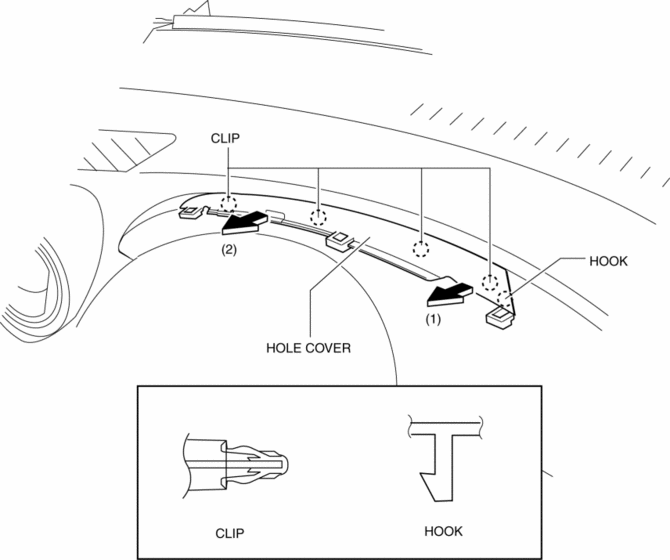
4. Remove the hole cover.
5. Install in the order of removal.
Test yourself
A quick Mazda 3 quiz: every answer comes with an explanation and a link to the manual page.