On Board Diagnostic System Simulation Inspection [Fw6 A EL]
1. Connect the M-MDS (IDS) to the DLC-2.
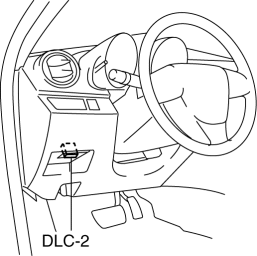
2. After the vehicle is identified, select the following items from the initialization screen of the IDS.
a. Select “DataLogger”.
b. Select “Modules”.
c. Select “TCM”.
3. Select the simulation items from the PID table.
4. Perform the active command modes function, inspect the operations for each parts.
If the operation of output parts cannot be verified after the active command mode inspection is performed, this could indicate the possibility of an open or short circuit, sticking, or operation malfunction in the output parts.
Item |
Description |
Unit/Condition |
Operation condition |
SS_ON-OFF |
On/off solenoid condition |
Off/On |
Under the following conditions:
|
SS1_C |
Shift solenoid No.1 target current |
A |
Under the following conditions:
|
SS2_C |
Shift solenoid No.2 target current |
A |
Under the following conditions:
|
SS3_C |
Shift solenoid No.3 target current |
A |
Under the following conditions:
|
SS4_C |
Shift solenoid No.4 target current |
A |
Under the following conditions:
|
SSLU_C |
TCC control solenoid target current |
A |
Under the following conditions:
|
SSP_C |
Pressure control solenoid target current |
A |
Idling at P or N position |
Test yourself
A quick Mazda 3 quiz: every answer comes with an explanation and a link to the manual page.