Interior Features
Commander Switch Operation
In this manual: Interior Features
8steps
~48min
2/5difficulty
Done 0 of 8
Operating the Keys Around the Control Knob
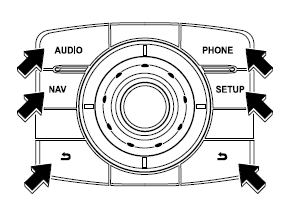
Press a switch around the control knob shown below to use it: : Audio screen is displayed : Navigation screen is displayed : Bluetooth composition screen is displayed : Setup screen is displayed : Same operation as the
" key.
on the screen
Control Knob Operation
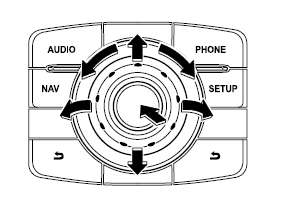
Selecting a Key on the Screen
- Turn the control knob to switch to the group of keys that contains the on-screen key you want to select, then move the cursor to it.
- Turn the control knob and move the cursor to the desired on-screen key.
- Press the control knob and select the on-screen key.
NOTE
If the knob is turned counterclockwise when the cursor is on the last item, the audio list moves to the top item.
If the knob is turned clockwise when the cursor is on the top item, the audio list moves to the last item.
Adjusting Settings
- Turn the control knob to switch to the settings item group, then move the cursor to it.
- Turn the control knob and move the cursor to the desired settings item.
- Press the control knob.
- Turn or switch the control knob to change the setting value.
- Press the control knob to exit the setting mode.
Test yourself
A quick Mazda 6 quiz: every answer comes with an explanation and a link to the manual page.
Was this page helpful?