Fully automatic type
Climate control system information appears on the display.
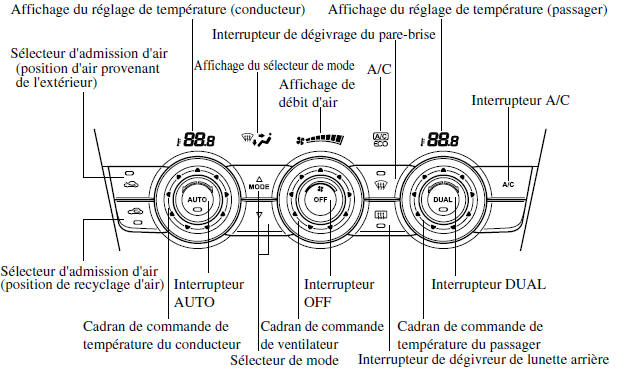
Control buttons
AUTO switch
When the AUTO switch is pressed, the following functions are automatically controlled according to the set temperature:
- Air outlet temperature
- Air flow volume
- Air flow mode selection
- Outside air/recirculated air selection
- Air conditioner operation
NOTE
AUTO switch indicator
- When on, it indicates automatic operation, and the system will operate automatically.
- If any of the dials or switches are operated while automatic control mode is active, the AUTO switch indicator turns off.
- Mode Selector
- Fan Control Dial
- Windshield Defrost Switch
The functions of the dials and switches other than those listed above continue to operate in automatic control mode.
OFF Switch
Press the OFF switch to turn off the temperature control system.
Temperature Control Dial
This dial controls the temperature. Turn it clockwise for warmer air and counterclockwise for cooler air.
- When the DUAL switch is off: Turn the driver's temperature control dial to control the temperature throughout the entire cabin.
- When the DUAL switch is on: Turn the driver's or front passenger's temperature control dial to independently control the temperature on each side of the cabin.
NOTE
The system enters individual operation mode (the DUAL switch indicator light comes on) when the front passenger's temperature control dial is turned, even when the DUAL switch is off, allowing independent control of the driver's and front passenger's temperature.
The temperature units for the temperature setting display can be changed together with the temperature units for the outside temperature display. Refer to Outside Temperature Display on page 4-14.
Fan Control Dial
The fan has four speeds. The selected speed will be displayed.
Mode Selector
The desired airflow mode can be selected (page 5-4).
NOTE
- With the airflow mode set to
 and the temperature control dial set to a medium temperature, warmed air is directed to the feet and cooler air is directed through the center, left and right vents.
- To set the air outlet to
 , press
the windshield defrost switch. - In the
 or
 position, the air conditioning is
automatically turned on and outside air mode is automatically selected to defrost the windshield. In the or
 position, outside air mode cannot be switched to recirculated air mode.
A/C Switch
Pressing the A/C switch while the AUTO switch is on turns off the air conditioning (cooling/dehumidifying functions).
The air conditioning can be turned on or off by pressing the A/C switch when the fan control dial is on.
NOTE
- The air conditioner operates when the A/C switch is pressed, even if the fan is off.
- The air conditioner may not operate if the outside temperature is near 0 C (32 F). (The indicator light stays on even when the system is off.)
Air Intake Selector
The outside air or recirculated air position can be selected.
Press the selector to select the outside air or recirculated air position.
Recirculated air position (
)
Use this position when driving through a tunnel, in heavy traffic (high exhaust gas levels), or for rapid cooling.
Outside air position ( )
Use this mode for ventilation or to defrost the wiper blades.
WARNING
In cold or rainy weather, do not use the position :
It is dangerous to use the  position in cold or rainy weather because this will fog the cabin windows. This may reduce visibility and could cause a serious accident.
DUAL Switch
Use the DUAL switch to change between individual operation (driver and passenger) and combined (simultaneous) modes.
Individual operation mode (indicator light on)
The set temperature can be controlled individually for the driver and front passenger.
Combined mode (indicator light off)
The set temperature is controlled simultaneously for the driver and front passenger.
Windshield Defrost Switch
Press the switch to defrost the windshield and the front door windows.
Automatic Air Conditioner Operation
- Press the AUTO switch. The airflow mode, air intake selector and airflow volume selections will be controlled automatically.
- Use the temperature control dial to select the desired temperature.
Press the OFF switch to stop the system.
NOTE
- Setting the temperature to maximum cold or maximum hot will not reach the desired temperature any faster.
- When heating is selected, the system will restrict airflow until the air is warm, to prevent cold air from blowing out of the vents.
Defrosting and defogging the windshield
Press the windshield defrost switch.
In this position, the outside air position is automatically selected and the air conditioner is automatically turned on. The air conditioner will direct dehumidified air to the windshield and side windows (page 5-4). The airflow volume will increase.
WARNING
Set the temperature control to the warm or mild position when defogging (position  ):
It is dangerous to use the  position with the temperature control set to cold because this will fog the outside of the windshield. This may reduce visibility and could cause a serious accident.
NOTE
Use the temperature control dial to increase the airflow temperature and defrost the windshield faster.
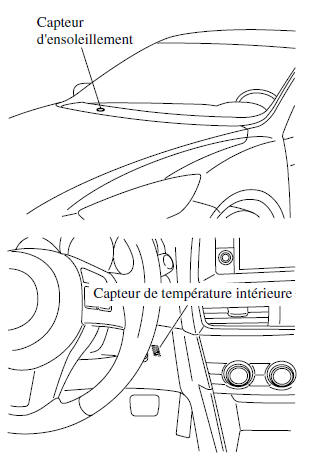
Temperature and Sunload Sensor
The fully automatic air conditioner function measures the interior and exterior temperatures and the sunload, then adjusts the cabin temperature accordingly.
WARNING
Do not block any of the sensors, otherwise the automatic air conditioner will not operate correctly.
Test yourself
A quick Mazda 6 quiz: every answer comes with an explanation and a link to the manual page.