Assist menu
Introduction
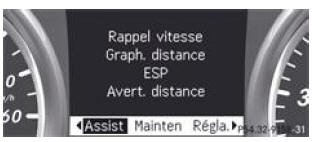
The Assist. menu allows you to carry out the following functions:
Displaying the speed limit prompt and switching the Speed Limit Warning function on or off
- Distance graph display
- Switching ESP® on and off
- Switching the distance warning on and off
- Switching ATTENTION ASSIST on and off
- Switching Blind Spot Assist on and off
- Switching Lane Assist on and off
Speed limit assist
Displaying the speed limit prompt
- Press the button
 or the
button on the steering wheel to select
the Assist. menu. - Press the button
 or the
button to select Speed limit
assist. - Press the button.
Under certain conditions, the multifunction display shows a speed limit that has been detected.
Switching the Speed Limit Warning function on and off
- Press the button
 or the
button on the steering wheel to select
the Assist. menu. - Press the button
 or the
button to select Speed limit
assist. - Press the button
 .
The multifunction display shows the speed limit prompt.
- Press the button
 .
The current selection is displayed.
- Switching on and off: press the button
 .
If the Speed Limit Warning function is switched on, any detected speed limit is shown automatically for 5 seconds. During this time, other displays on the multifunction display are hidden.
If the speed limit prompt is operational and the warning function is switched on, the symbol is shown
on the multifunction display when the ignition is switched on.
Distance graph display
- Press the button
 or the
button on the steering wheel to select
the Assist. menu. - Press the button
 or the
button to select Distance
graph. - Press the button
 .
The DISTRONIC PLUS distance graph appears on the multifunction display.
Switching ESP® off and on
WARNINGIf the warning lamp on the instrument cluster
flashes, proceed as follows:
- Never switch off ESP®.
- When starting off, press the accelerator pedal just enough.
- Adapt your driving style to the current road and weather conditions.
Otherwise, the vehicle could skid.
ESP® cannot reduce the risk of an accident if you drive too fast. ESP® cannot override the laws of physics.
WARNINGIf the warning lamp warning lamp in the instrument cluster
is lit while the engine is running, ESP® is switched off or is not available due to a malfunction. The risk of your vehicle skidding is higher in certain situations.
Always adapt your driving style to the current road and weather conditions.
For more information on ESP®, see.
Start the engine.
- Press the button
 or the
button on the steering wheel to select
the Assist. menu. - Press the button
 or the
button to select ESP .
- Press the button
 .
- Switching off: press the button again
 .
The warning lamp in the
instrument cluster lights up.
- Switching on: press the button again
The warning lampin the
instrument cluster goes out.
Switching the distance warning on and off
- Press the buttonor the
buttonon the steering wheel to select
the Assist. menu. - Press the buttonor the
buttonto select Distance
warning. - Press the button.
The current selection is displayed.
- Switching on and off: press the button again.
When the distance alert is activated, the symbol is shown on the multifunction display,
provided the HOLD function is not activated.
Vehicles equipped with Active Parking Assist: when PARKTRONIC is switched on and the speed is below 35 km/h, the Active Parking Assist symbol is shown instead of the symbol
For more information on the distance warning, see
Switching ATTENTION ASSIST on and off
- Press the button
 or the
button on the steering wheel to select
the Assist. menu. - Press the button
 or the
button to select AttentionAssist
. - Press the button
 .
The current selection is displayed.
- Switching on and off: press the button again
 .
If ATTENTION ASSIST is switched on, the symbol is shown on the multifunction display
when the ignition is switched on.
Switching Blind Spot Assist on and off
- Press the buttonor the
buttonon the steering wheel to select
the Assist. menu. - Press the buttonor the
buttonto select Blind spot
warn. . - Press the button.
The current selection is displayed.
- Switching on and off: press the button again.
You will find more information on Blind Spot Assist at
Switching Lane Assist on and off
- Press the buttonor the
buttonon the steering wheel to select
the Assist. menu. - Press the buttonor the
buttonto select Lane
assist . - Press the button.
The current selection is displayed.
- Confirm with.
- Press the buttonor the
buttonto set Off ,
Standard or Adaptive . - Press the buttonto
store the setting.
If Lane Assist is switched on, the symbol is shown on the multifunction display
when the ignition is switched on.
Test yourself
A quick Mercedes-Benz B-Class quiz: every answer comes with an explanation and a link to the manual page.