On-board computer and displays
Navigation menu
In this manual: On-board computer and displays
15steps
~90min
4/5difficulty
Done 0 of 15
Displaying navigation messages
- Switch on the Audio 20 system with the Becker® MAP PILOT or COMAND Online system (see the separate operator's manual).
- Press the button
 or the
button Button on the steering wheel
to select the Nav menu.
In the Nav menu, the multifunction display shows navigation messages. You will find further information in the separate operator's manual.
Guidance off
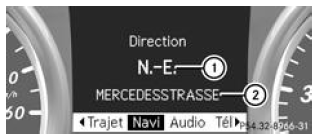
- Direction of travel
- Current road
Guidance on
No manoeuvre announced
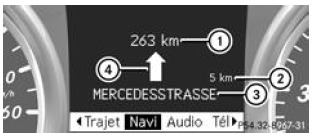
- Distance remaining to the destination
- Distance to the next manoeuvre
- Current road
- Symbol for "follow the road"
Manoeuvre announced without lane recommendation
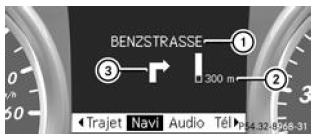
- Road to take
- Distance to the manoeuvre and graphic display of the distance
- Manoeuvre symbol
When a manoeuvre is announced, a graphic display of distance 2 appears next to the manoeuvre symbol 3.
It decreases from the bottom as you approach the announced manoeuvre point.
Announced manoeuvre with lane recommendation
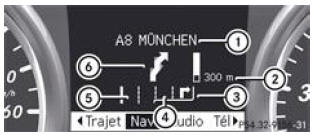
- Road to take
- Distance to the manoeuvre and graphic display of the distance
- Lane recommendation
- Additional lane appearing during the manoeuvre
- Continuous lane
- Manoeuvre symbol
If the road has several lanes, the system may show a lane recommendation for the manoeuvre to be carried out. Additional lanes may appear during a manoeuvre.
Lane recommendations are only shown if the digital map contains the corresponding data.
Other navigation system status displays
 : you have reached your destination
or you have reached an intermediate destination.- Recalculating route... or Calculating route: the system is calculating a new route.
- No map or Unknown road: the vehicle position is outside the area covered by the digital map (Off Map position).
- No route: no route can be calculated to the selected destination.
Test yourself
A quick Mercedes-Benz B-Class quiz: every answer comes with an explanation and a link to the manual page.
Was this page helpful?