Trip menu
Display at standstill
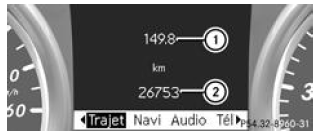
- Hold the button
 Button on the steering wheel
pressed until the Trip menu with the daily odometer 1 and the total odometer 2 appears.
On-board computer "Since start" or "Since reset 0"
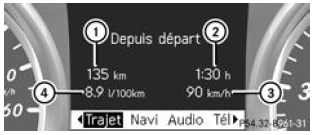
On-board computer "Since start" (example)
- Distance travelled
- Time
- Average speed
- Average fuel consumption
- Press the button
 or the
button Button on the steering wheel
to select the Trip menu. - Press the button
 or the
button to select Since
start or Since reset 0.
The values shown in the Since start submenu are calculated from the start of the journey; those in the Since reset 0 submenu from the last reset of the submenu.
The values shown under Since start reset automatically to zero
- if the ignition is switched off for more than 4 hours
- after 999 hours
- after 9,999 kilometres
The values shown under Since reset 0 reset automatically to zero after 9,999 hours or 99,999 kilometres.
Display of range and current fuel consumption
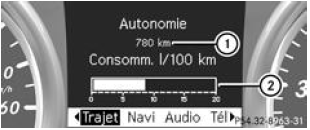
- Approximate range
- Current fuel consumption
- Press the buttonor the
buttonButton on the steering wheel
to select the Trip menu. - Press the buttonor the
buttonto select the current fuel consumption
2 and the approximate range 1.
The approximate range 1 is calculated from the amount of fuel left in the tank and your driving style. If there is hardly any fuel left in the tank, the approximate range 1 is replaced by a symbol showing a vehicle being refuelled .
Digital speedometer
When the gear change recommendation appears on the multifunction display, the one shown on the status indicator disappears.Resetting values
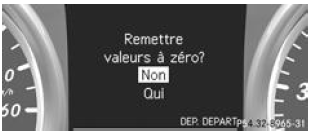
Resetting the values shown under "Since start" (example) You can reset the values of the following functions:
- Daily odometer
- On-board computer "Since start"
- On-board computer "Since reset 0"
- Press the buttonor the
buttonButton on the steering wheel
to select the Trip menu. - Press the buttonor the
buttonto select the function
you want to reset. - Press the button
 .
- Press the buttonto
select Yes, then confirm with .
Test yourself
A quick Mercedes-Benz B-Class quiz: every answer comes with an explanation and a link to the manual page.