SPEEDTRONIC
General notes
SPEEDTRONIC brakes the vehicle automatically so that the set speed is not exceeded. On long, steep downhill gradients, shift to a lower gear in good time, especially when the vehicle is loaded or towing a trailer. To do this, first select manual driving program M (vehicles with automatic transmission). This way you use the engine braking effect. In doing so, you relieve the braking system and prevent overheating and rapid brake wear. If you still need to brake, do not press the brake pedal continuously; apply it at intervals.
You can set a speed limit that is
- variable to observe temporary speed limits (in built-up areas, for example)
- permanent to observe long-term speed limits (such as those imposed by the use of winter tyres, for example)
Important safety notes
WARNINGNever apply the brakes continuously while driving (for example, do not drag the brakes by constantly applying light pressure to the brake pedal). This causes the braking system to overheat, increases the braking distance and may result in a complete loss of braking effect.
WARNINGOn slippery roads, do not downshift to brake the vehicle. The drive wheels may lose traction and the vehicle may skid.
WARNINGSPEEDTRONIC is a driver assistance system only. You are responsible for the vehicle speed and for deciding when to brake.
Variable SPEEDTRONIC
General notes
The CRUISE CONTROL lever is used to operate CRUISE CONTROL or DISTRONIC PLUS and variable SPEEDTRONIC.
The LIM indicator lamp built into the CRUISE CONTROL lever shows which system you have selected:
- LIM indicator lamp off: CRUISE CONTROL or DISTRONIC PLUS is selected
- LIM indicator lamp on: variable SPEEDTRONIC is selected
With the engine running, the CRUISE CONTROL lever lets you set a speed limit starting from 30 km/h.
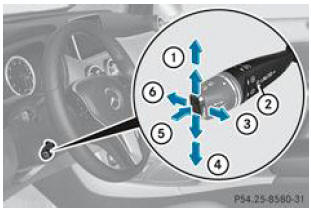
- Storing the current speed or a higher speed
- LIM indicator lamp
- Storing the current speed or recalling the last stored speed
- Storing the current speed or a lower speed
- Switching between CRUISE CONTROL or DISTRONIC PLUS and variable SPEEDTRONIC
- Switching off variable SPEEDTRONIC
Selecting variable SPEEDTRONIC
WARNING If the driver changes, draw the new driver's attention to the stored speed limit.Use variable SPEEDTRONIC only if you are sure you will not need to accelerate suddenly to a speed above the stored limit. Otherwise, you may cause an accident.
You can exceed the stored speed limit only by switching off variable SPEEDTRONIC
- with the CRUISE CONTROL lever
- when you press the accelerator pedal beyond the pressure point (kickdown)
You cannot switch off variable SPEEDTRONIC by braking.
- Check whether the LIM 2 indicator lamp is lit.
If it is, variable SPEEDTRONIC is already activated.
If it is on, move the CRUISE CONTROL lever in direction 5.
The LIM 2 indicator lamp built into the CRUISE CONTROL lever is lit. Variable SPEEDTRONIC is selected.
- Make sure the accelerator pedal is not pressed beyond the pressure point.
Storing the current speed
With the engine running, the CRUISE CONTROL lever lets you set a speed limit starting from 30 km/h.
- Briefly move the CRUISE CONTROL lever up 1 or down 4.
The current speed is stored. The set speed appears on the multifunction display for approximately 5 seconds, for example Limit 100 km/h.
The segments of the speedometer between the start of the scale and the stored speed are lit.
Storing the current speed or recalling the last stored speed
WARNINGRecall the stored speed only if you know it and if the situation permits. Otherwise, sudden braking may expose you to danger or endanger other people.
- Briefly pull the CRUISE CONTROL lever toward you 3.
- Adjusting the speed in increments of 1 km/h: briefly push the CRUISE CONTROL lever up 1 to the pressure point to increase the speed, or down 4 to decrease it.
- Push the CRUISE CONTROL lever to the pressure point and hold it in this position until the desired speed is reached. Push it upward 1 to increase speed or downward 4 to decrease it.
- Speed adjustment in increments of 10 km/h: briefly push the CRUISE CONTROL lever past the pressure point upward 1 to increase speed or downward 4 to decrease it.
- Push the CRUISE CONTROL lever past the pressure point and hold it in this position until the desired speed is reached. Push it upward 1 to increase speed or downward 4 to decrease it.
Switching off variable SPEEDTRONIC
WARNING You cannot deactivate variable SPEEDTRONIC by braking.
You can deactivate variable SPEEDTRONIC in several ways:
- Briefly push the CRUISE CONTROL lever forward 6.
- Briefly move the CRUISE CONTROL lever in direction 5.
The indicator lamp LIM 2 built into the CRUISE CONTROL lever goes out. Variable SPEEDTRONIC is deactivated.
CRUISE CONTROL or DISTRONIC PLUS is selected.
Variable SPEEDTRONIC deactivates automatically when
- you press the accelerator pedal past the pressure point (kickdown). It deactivates only if the difference between your vehicle's current speed and the stored speed does not exceed 20 km/h. At this point, an audible signal sounds.
- you engage a gear that is too low (vehicles with manual transmission), causing the engine speed to drop too far
The last stored speed is erased when you switch off the engine.
Permanent SPEEDTRONIC
You can permanently limit the speed to a value between 160 km/h (for example, when using winter tires) and the vehicle's maximum speed via the on-board computer.
Just before you reach the stored speed, it is shown on the multifunction display.
Permanent SPEEDTRONIC remains active even when variable SPEEDTRONIC is deactivated.
You cannot exceed the stored speed limit, even by pressing the accelerator pedal past the pressure point (kickdown).
Test yourself
A quick Mercedes-Benz B-Class quiz: every answer comes with an explanation and a link to the manual page.