Reversing camera
General notes

Reversing camera in the tailgate handle The reversing camera 1 is an optical parking aid system. It allows you to see the area behind the vehicle on the audio/COMAND display, represented by guide lines.
The image of the area behind the vehicle is reversed, as in the interior rearview mirror.
Important safety notes
WARNING
Make sure that no people or animals are in the maneuvering area. Otherwise, they could be injured.
WARNINGThe reversing camera is only a support system. It may display a distorted or incorrect view of obstacles or not display them at all. It cannot replace your attentiveness. The camera cannot detect objects that are
- very close to the rear bumper
- under the rear bumper
- in the immediate vicinity, above the recessed tailgate handle
You are solely responsible for safety and must continue to monitor your immediate surroundings when maneuvering. This applies to areas at the rear, front and sides of the vehicle. Otherwise, you could expose yourself or others to danger.
WARNINGThe reversing camera does not work or works only to a limited extent when
- the tailgate is open
- it is raining or snowing very heavily or there is fog
- it is dark or you are in a very dark place
- the camera is exposed to very bright light
- the surroundings are lit by fluorescent lighting, for example fluorescent tubes or LED lighting (the image may flicker)
- the temperature changes suddenly, for example in winter when you enter a heated garage
- the camera lens is dirty or covered
- the rear of your vehicle is damaged. In this case, have the position and adjustment of the camera checked by a qualified workshop. Mercedes-Benz recommends that you contact your Mercedes-Benz Service Center for this.
In this case, do not use the reversing camera. Otherwise, you could injure someone or damage objects and the vehicle during parking maneuvers.
Activating and deactivating the reversing camera
- Activation: make sure the key is in position 2 in the ignition lock.
- Make sure the 'Reversing camera' function is selected in the audio system or COMAND Online (see the separate operator's manual for the audio system/COMAND Online).
- Engage reverse gear.
The area behind the vehicle is represented by guide lines on the audio/COMAND display.
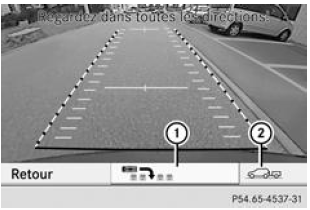
Display of operating mode (vehicles with COMAND Online and a trailer hitch)
- Switching the operating mode (vehicles equipped with COMAND Online and a trailer hitch): Select symbol 1 for the "Reverse parking" function using the COMAND controller (see the separate COMAND Online operator's manual).
- Select symbol 2 for the "Trailer hitching" function (see the separate COMAND Online operator's manual).
The symbol for the selected function is highlighted.
Deactivation: the reversing camera deactivates when
- you shift the transmission into P (vehicles with automatic transmission)
- you drive forward 10 meters
- you move the selector lever out of R into another position (vehicles with automatic transmission) after 15 seconds
- you disengage reverse gear (vehicles with manual transmission) after 15 seconds
- you drive forward at more than 10 km/h
Displays on the audio/COMAND screen
WARNINGUsing the reversing camera can be dangerous if you are colour blind or have difficulty distinguishing colours.
Only use the reversing camera if you can see the colour guide lines and can distinguish those shown by the reversing camera on the audio/COMAND screen.
WARNINGKeep in mind that objects which are not at ground level are actually closer than they appear, for example
- the bumper of a vehicle parked behind your vehicle
- a drawbar
- the ball of a trailer hitch
- the rear of a truck
- an angled post
The guide lines are only an orientation aid and do not allow you to measure the distance to an obstacle.
Do not go past the red guide line when approaching an obstacle. Otherwise, you may cause an accident and expose yourself or others to danger.
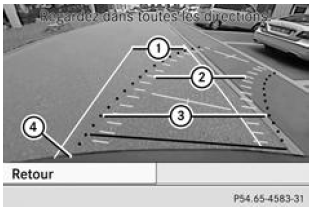
Trajectory lines
- White trajectory line the width of the vehicle corresponding to a steering angle of zero (static)
- Yellow tyre trajectory line corresponding to the current steering angle (dynamic)
- Red trajectory line the width of the vehicle corresponding to the current steering angle (dynamic)
- Bumper
For the red and white trajectory lines, the vehicle width is measured with the exterior mirrors extended. For the yellow trajectory line, the vehicle width measured corresponds to the distance between the outer faces of the wheels.
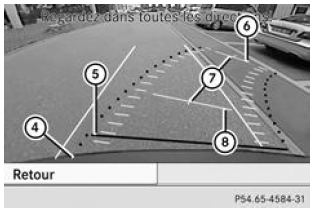
Guide lines
- Bumper
- Red guide line approx. 0.25 m from the rear area
- Yellow guide line approx. 4.0 m from the rear area
- Vehicle centre line (guide line)
- Yellow guide line approx. 1.0 m from the rear area
The trajectory lines and guide lines are only displayed when reverse gear is engaged.
The distances shown only apply to objects located at ground level.
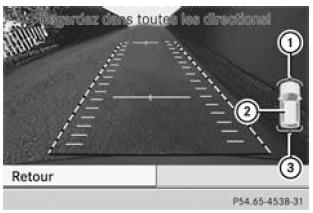
Additional display (vehicles with PARKTRONIC and COMAND Online)
- Front indicators
- Additional PARKTRONIC readiness indicator
- Rear indicators
Vehicles with PARKTRONIC and COMAND Online: when PARKTRONIC is operational, the additional system readiness indicator 2 appears on the COMAND screen. When the PARKTRONIC indicators are activated or illuminate, indicators 1 and 3 are also activated or illuminate on the COMAND screen.
"Reverse parking" function
- Make sure the reversing camera is switched on and the "Reverse parking" function is selected (see the separate audio system/COMAND Online operator's manual).
The trajectory lines and guide lines are displayed.
Reverse parking (perpendicular) without steering the wheel
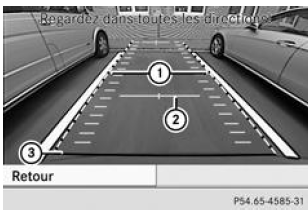
- White trajectory line corresponding to a steering angle of zero
- Yellow guide line approx. 1.0 m from the rear area
- Red guide line approx. 0.25 m from the rear area
- Using white trajectory line 1, check that the parking space is large enough for the vehicle.
- Reverse carefully, using the white trajectory line as a guide, until you reach the final position.
Red guide line 3 is then at the end of the parking space. The vehicle is in the parking space, approximately centred.
Reverse parking (angled) with steering
- Stop the vehicle after passing the parking space.
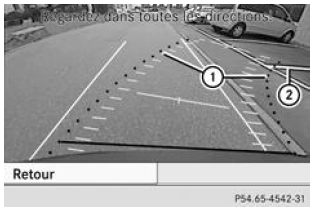
Steering
- Red trajectory line corresponding to the current steering angle
- Parking space boundary markings
- With the vehicle stationary, turn the steering wheel in the direction of the parking space until the red trajectory line reaches the parking space boundary markings 2.
- Maintain the correct steering angle and reverse carefully.
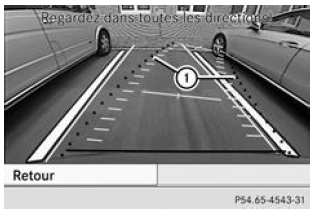
Reverse manoeuvres with steering
- Red trajectory line corresponding to the current steering angle
- Stop when the vehicle is in front of the parking space, approximately centred.
The white trajectory line should be as parallel as possible to the parking space boundary markings.
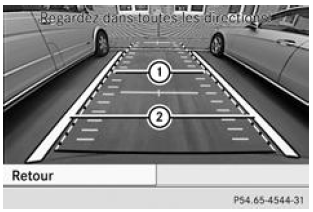
Moving into the final position
- White trajectory line corresponding to the current steering angle
- Parking space boundary markings
- With the vehicle stationary, return the wheels to the straight-ahead position.
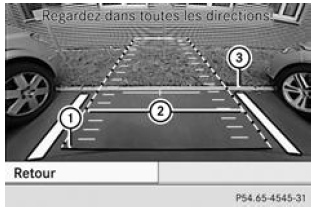
- Red guide line approx. 0.25 m from the rear area
- White trajectory line corresponding to a steering angle of zero
- End of the parking space
- Reverse carefully until you reach the final position.
Red guide line 1 is then at the end of parking space 3. The vehicle is in the parking space, approximately centred.
"Trailer hitching" function
This function is only available on vehicles equipped with a trailer hitch and COMAND Online.
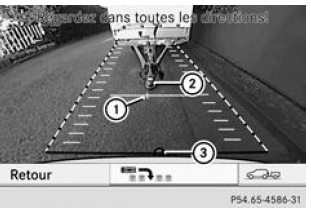
- Vehicle centre at the yellow guide line approx. 1.0 m from the rear area
- Drawbar
- Ball
- Adjust the height of drawbar 2 so that the drawbar is slightly above ball 3.
- Position the vehicle centrally in front of drawbar 2.
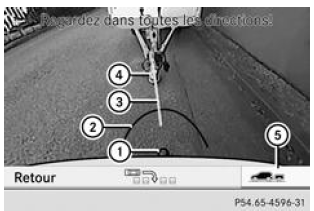
- Ball
- Red guide line approx. 0.25 m from the ball
- Drawbar reference line
- Drawbar
- Symbol representing the "Trailer hitch" function
- Select symbol 5 using the audio/COMAND selector (see the separate operator's manual for the audio system/COMAND Online).
The "Trailer hitch" function is selected. The distances shown now apply only to objects at the level of the ball coupling.
- Reverse carefully, making sure that drawbar reference line 3 roughly aligns with drawbar 4.
- Reverse carefully until drawbar 4 touches red reference line 2.
- Hitch up the trailer
Test yourself
A quick Mercedes-Benz B-Class quiz: every answer comes with an explanation and a link to the manual page.