DISTRONIC PLUS
Important safety notes
WARNINGOn slippery roads, do not downshift to brake the vehicle. The drive wheels may lose traction and the vehicle may skid.
WARNINGDISTRONIC PLUS is only a driver assistance system. You are responsible for maintaining a safe distance from other vehicles, for the vehicle speed and for deciding whether to brake.
In particular, DISTRONIC PLUS does not detect
- pedestrians
- stationary obstacles on the roadway (for example, stopped or parked vehicles)
- vehicles travelling in the opposite direction or on a crossing road
DISTRONIC PLUS may not detect narrow vehicles, such as motorcycles or vehicles travelling with an offset course. Therefore, always pay attention to traffic conditions, even when DISTRONIC PLUS is activated, so that you can detect hazards in time. Otherwise, you could cause an accident and injure yourself or others.
WARNINGDISTRONIC PLUS cannot assess road or traffic conditions.
Deactivate DISTRONIC PLUS or do not activate it if it does not detect or no longer detects the vehicle ahead.
This is particularly the case
- before curves
- on ramps
- when the vehicle enters a lane with faster-moving traffic
- in complex traffic situations (for example, construction zones on motorways)
Otherwise, DISTRONIC PLUS maintains the vehicle speed at the value you have set or accelerates the vehicle up to the set speed.
DISTRONIC PLUS does not take weather conditions into account. Deactivate DISTRONIC PLUS or do not activate it
- on slippery, snow-covered or icy roads. Otherwise, the wheels could lose grip when braking or accelerating, and your vehicle could skid.
- when the sensors are dirty or visibility is poor (for example, in snow, rain or fog). Distance control may be impaired.
Always pay attention to traffic conditions, even when DISTRONIC PLUS is activated, so that you can detect hazards in time. Otherwise, you could cause an accident and injure yourself or others.
WARNINGDISTRONIC PLUS brakes your vehicle according to its speed, with a maximum deceleration of 4 m/s². This corresponds to approx. 40 % of the vehicle's maximum braking power. If this braking power is not sufficient, you must also brake.
When DISTRONIC PLUS detects a risk of collision with the vehicle ahead, an intermittent warning signal sounds. In addition, the distance warning lamp which
is located in the instrument cluster, lights up. Brake to avoid a collision!
DISTRONIC PLUS can brake your vehicle when it is activated. Therefore, deactivate DISTRONIC PLUS if the vehicle must be towed (or driven through an automatic car wash).
General notes
DISTRONIC PLUS controls the speed and automatically helps you maintain the safe distance to the vehicle ahead. DISTRONIC PLUS brakes the vehicle automatically so that the set speed is not exceeded.
On long and steep downhill gradients, shift to a lower gear in good time, especially when the vehicle is loaded or towing a trailer. To do this, first select the manual driving program M. This allows you to use the engine braking effect. In doing so, you relieve the braking system and prevent overheating and rapid brake wear.
When DISTRONIC PLUS detects a slower vehicle ahead of you, it brakes your vehicle as you approach in order to maintain the distance to the other vehicle at the set value.
When no vehicle is ahead of you, DISTRONIC PLUS functions like CRUISE CONTROL and operates between 30 km/h and 200 km/h. When a vehicle is ahead of you, it operates between 0 km/h and 200 km/h.
Do not use DISTRONIC PLUS on roads with steep gradients (uphill or downhill).
CRUISE control lever
The CRUISE CONTROL lever allows you to control DISTRONIC PLUS and SPEEDTRONIC variable.
The LIM indicator lamp built into the CRUISE CONTROL lever shows which system you have selected:
- LIM lamp off: DISTRONIC PLUS is selected
- LIM lamp on: SPEEDTRONIC variable is selected

- Storing the current speed or a higher speed
- Setting the set distance
- LIM indicator lamp
- Storing the current speed or recalling the last stored speed
- Storing the current speed or a lower speed
- Switching between DISTRONIC PLUS and SPEEDTRONIC variable
- Deactivating DISTRONIC PLUS
Selecting DISTRONIC PLUS
- Check whether the LIM lamp 3 is off.
If it is, DISTRONIC PLUS is already selected.
If it is not, move the CRUISE CONTROL lever in direction 6.
The LIM lamp 3 integrated in the CRUISE CONTROL lever goes out. DISTRONIC PLUS is selected.
Activating DISTRONIC PLUS, storing, maintaining and resuming the speed
Activation conditions
To activate DISTRONIC PLUS, the following activation conditions must be met:
- The engine must be running. If necessary, up to 2 minutes may pass after starting the vehicle before DISTRONIC PLUS is operational.
- The electric parking brake must be released.
- ESP® must be switched on but must not intervene.
- The transmission must be in D.
- The driver's door must be closed when shifting from P to D, or you must have fastened your seat belt.
- The front passenger door and the rear doors must be closed.
- The vehicle must not be skidding.
Activation
Activation while driving: below 20 km/h, you can activate DISTRONIC PLUS only if the vehicle ahead is detected and shown on the multifunction display. If the vehicle ahead is no longer detected and is no longer shown, DISTRONIC PLUS is deactivated and an audible signal sounds.
- Briefly pull the CRUISE CONTROL lever towards you 4, or move it upward 1 or downward 5.
DISTRONIC PLUS is activated.
- Move the CRUISE CONTROL lever upward 1 or downward 5 and hold it in this position until the desired speed is set.
- Take your foot off the accelerator pedal.
Your vehicle adjusts its speed to that of the vehicle ahead, without exceeding the desired and stored speed.
If you do not fully release the accelerator pedal, the message DISTRONIC PLUS inactive appears on the multifunction display. The distance to a slower vehicle ahead will not be maintained. The vehicle travels at the speed determined by the position of the accelerator pedal.Activation when the vehicle ahead is stationary: when the vehicle ahead of you is stationary, you can activate DISTRONIC PLUS only if your vehicle is also stationary.
Briefly pull the CRUISE CONTROL lever towards you 4, or move it upward 1 or downward 5.
DISTRONIC PLUS is activated.
You can only activate DISTRONIC PLUS below 20 km/h if a vehicle ahead is detected. It may therefore be useful to display the DISTRONIC PLUS distance graphic on the multifunction display.- Move the CRUISE CONTROL lever upward 1 or downward 5 and hold it in this position until the desired speed is set.
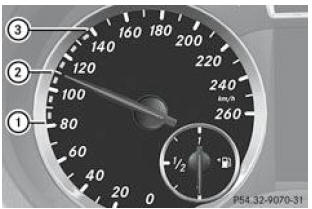
DISTRONIC PLUS display on the speedometer
When you activate DISTRONIC PLUS, 1 or 2 of the segments 2 on the speedometer corresponding to the stored speed light up.
For design reasons, the speed shown on the speedometer may differ from the speed stored by DISTRONIC PLUS.When DISTRONIC PLUS detects a vehicle ahead of you, the segments 2 on the speedometer between the speed of that vehicle 1 and the stored speed 3 light up.
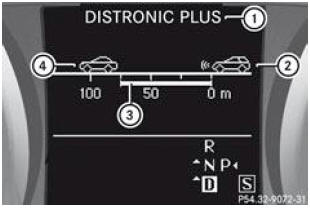
Graphic distance display on the multifunction display when DISTRONIC PLUS is activated
- DISTRONIC PLUS activated
- Your vehicle
- Set distance to the vehicle ahead (adjustable)
- Vehicle ahead, if detected
You can select the graphic distance display in the Assistance menu of the on-board computer.
Select the Graph. distance function via the on-board computer
When you activate DISTRONIC PLUS, the stored speed is shown for approximately 5 seconds.Driving
WARNINGWhen you depress the brake pedal, you deactivate DISTRONIC PLUS, unless the vehicle is stationary. DISTRONIC PLUS will then no longer brake the vehicle. In this case, adjust the distance to the vehicle ahead using the brake pedal only. Otherwise, you could cause an accident and injure yourself or others.
You are solely responsible for the safe distance to other vehicles, the vehicle speed and whether braking is appropriate.
Starting the vehicle
- When the vehicle ahead starts moving: take your foot off the brake pedal.
- Briefly pull the CRUISE CONTROL lever towards you.
- Briefly press the accelerator pedal.
Your vehicle starts moving and adjusts its speed to that of the vehicle ahead.
When no vehicle is ahead of you, DISTRONIC PLUS functions like CRUISE CONTROL.
If DISTRONIC PLUS detects that the vehicle ahead is traveling more slowly, it brakes your vehicle. It thus maintains the distance at the set value.
If DISTRONIC PLUS detects that the vehicle ahead is traveling faster, it accelerates your vehicle, up to the stored speed at most.
Lane change
WARNINGDISTRONIC PLUS is a driver assistance system only.
It cannot replace your attention. You are responsible for maintaining a safe distance from other vehicles, for your vehicle speed, and for deciding when to brake. Always pay attention to traffic conditions and your immediate surroundings so that you can detect hazards in time. Otherwise, you could cause an accident and injure yourself or other persons.
If you change lanes to drive in the passing lane, DISTRONIC PLUS assists you when
- you are driving at more than 60 km/h
- DISTRONIC PLUS maintains the required distance from the vehicle ahead
- you switch on the corresponding turn signal
- DISTRONIC PLUS does not detect any risk of collision at that time
If these conditions are met, the vehicle accelerates. If the lane change takes too long or if the distance to the vehicle ahead becomes insufficient, the acceleration process is interrupted.
During a lane change, DISTRONIC PLUS monitors the left lane for vehicles with left-hand steering and the right lane for vehicles with right-hand steering.
Stopping the vehicle
WARNINGNever leave the vehicle with DISTRONIC PLUS activated! DISTRONIC PLUS must also never be operated, activated or deactivated by a passenger or from outside the vehicle.
DISTRONIC PLUS does not replace the electric parking brake and must not be used to immobilize the vehicle.
DISTRONIC PLUS no longer brakes and the vehicle may start rolling if
- you deactivate DISTRONIC PLUS with the TEMPOMAT lever
- you press the accelerator pedal
- the system or the power supply has a fault (a battery failure, for example)
- work is carried out on the electrical system in the engine compartment or on the
- battery or fuses
- you disconnect the battery
When you leave the vehicle or stop it, deactivate DISTRONIC PLUS and secure the vehicle so that it cannot roll away.
If DISTRONIC PLUS detects that the vehicle ahead stops, it brakes your vehicle to a standstill.
Your vehicle is held stationary without you having to press the brake pedal.
After a certain time, your vehicle is held stationary by the electric parking brake to relieve the service brake. Depending on the set distance, your vehicle stops at an appropriate distance from the vehicle ahead. The desired distance is set with the setting wheel built into the CRUISE CONTROL lever.The electric parking brake automatically immobilizes the vehicle if DISTRONIC PLUS is activated and
- you open the driver's door and unfasten your seat belt
- you switch off the engine, unless it is stopped by the ECO automatic engine start/stop function
- a fault occurs in the system
- the power supply is insufficient
In the event of a fault, the transmission may also automatically shift to P.
Storing the current speed or recalling the last stored speed
WARNINGRecall the stored speed only if you know it and if traffic conditions permit.
Otherwise, inadvertent sudden acceleration or braking could endanger you or other people.
- Briefly pull the CRUISE CONTROL lever towards you.
- Take your foot off the accelerator pedal.
DISTRONIC PLUS is activated and adopts the current speed of the vehicle if this is the first activation, or regulates the speed according to the last stored value.
Adjusting the speed

- Storing the current speed or a higher speed
- Storing the current speed or a lower speed
- Push the TEMPOMAT lever up 1 to increase the speed or down 2 to reduce it.
- Hold the CRUISE CONTROL lever in this position until the desired speed is reached.
- Release the CRUISE CONTROL lever.
The new speed is stored. DISTRONIC PLUS is activated and regulates the vehicle speed according to the new stored value.
- Speed adjustment in steps of 1 km/h: briefly push the TEMPOMAT lever up 1 or down 2 up to the pressure point.
The last stored speed increases or decreases in increments of 1 km/h.
- Speed adjustment in steps of 10 km/h: briefly push the TEMPOMAT lever up 1 or down 2 beyond the pressure point.
The last stored speed increases or decreases in increments of 10 km/h.
You cannot deactivate DISTRONIC PLUS by pressing the accelerator pedal. If you accelerate to overtake, DISTRONIC PLUS restores the last stored speed as soon as you release the accelerator pedal.Setting the set distance
You can set the target distance for DISTRONIC PLUS by adjusting the time gap to the vehicle ahead within a range of 1.0 to 2.0 seconds. DISTRONIC PLUS uses this setting to regulate the distance to the vehicle ahead depending on speed. This distance is shown on the multifunction display.
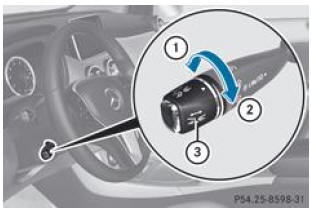
- Increasing the distance: turn the adjusting wheel 3 in direction 2.
DISTRONIC PLUS maintains a greater distance from the vehicle ahead.
- Reducing the distance: turn the adjusting wheel 3 in direction 1.
DISTRONIC PLUS maintains a shorter distance from the vehicle ahead.
Always observe the legal minimum distance to the vehicle ahead. Change the distance to the vehicle ahead if necessary.Deactivating DISTRONIC PLUS
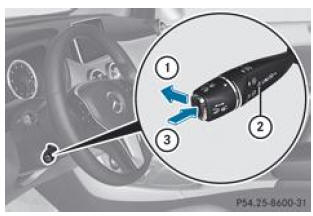
You can deactivate DISTRONIC PLUS in several ways:
- Briefly push the TEMPOMAT lever forward 1.
- Brake, unless the vehicle is stationary.
- Briefly push the TEMPOMAT lever in direction 3.
Variable SPEEDTRONIC is selected. The LIM 2 indicator lamp built into the CRUISE CONTROL lever is lit.
When you deactivate DISTRONIC PLUS, the message DISTRONIC PLUS deactivated appears on the multifunction display for approximately 5 seconds.
The last set speed remains stored until you switch off the engine.DISTRONIC PLUS deactivates automatically if
- you apply the electric parking brake or if it automatically immobilizes the vehicle
- no vehicle is ahead of you or detected while you are driving at less than 10 km/h
- ESP® intervenes or you switch it off
- the transmission is in P, R or N
- you pull the TEMPOMAT lever toward you to start while the front passenger door or one of the rear doors is open
- the vehicle has skidded
An audible signal sounds when DISTRONIC PLUS deactivates. The message DISTRONIC PLUS deactivated appears on the multifunction display for approximately 5 seconds.
You can select the graphic distance display in the Assist menu of the trip computer.
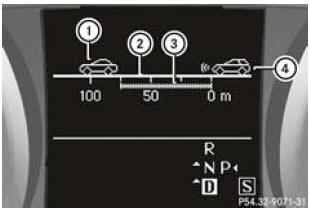
Graphic distance display when DISTRONIC PLUS is deactivated
- Vehicle ahead, if detected
- Distance scale: current distance to the vehicle ahead
- Set distance to the vehicle ahead (adjustable)
- Your vehicle
- Select the Distance graph function via the trip computer.
Recommendations for driving with DISTRONIC PLUS
General notes
Some situations that require particular attention are described below. In these situations, brake if necessary. DISTRONIC PLUS is then deactivated.
Curves, entering and exiting curves
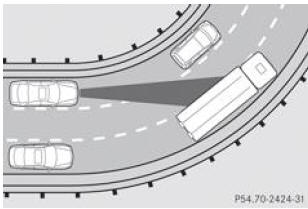
On curves, DISTRONIC PLUS can only detect vehicles to a limited extent. It may therefore brake the vehicle unexpectedly or late.
Offset paths
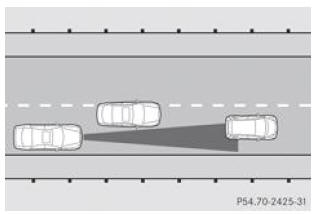
DISTRONIC PLUS may not detect vehicles whose path is offset. In this case, the distance to the vehicle ahead will be too short.
Another vehicle changing lanes
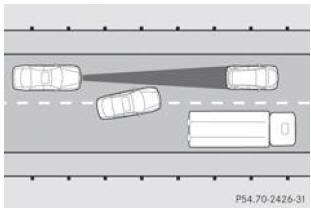
DISTRONIC PLUS does not immediately detect vehicles that change lanes. The distance to the vehicle changing lanes will be too short.
Narrow vehicles
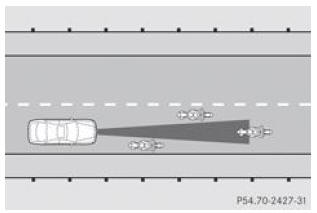
DISTRONIC PLUS does not detect vehicles located at the edges of the lane being used due to their narrow width. In this case, the distance to the vehicle ahead will be too short.
Obstacles and stationary vehicles
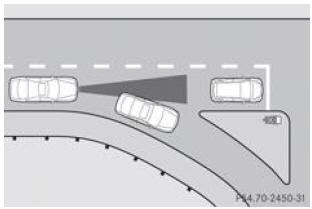
DISTRONIC PLUS does not brake for obstacles or stationary vehicles. For example, when the detected vehicle turns and an obstacle or a stationary vehicle appears, DISTRONIC PLUS does not brake.
Vehicles on crossing roads
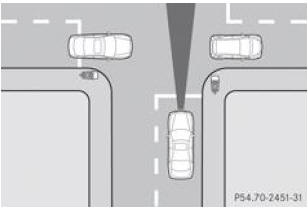
DISTRONIC PLUS may incorrectly detect vehicles traveling on crossing roads. For example, if you activate DISTRONIC PLUS at a red light at an intersection, your vehicle may start moving unintentionally.
Test yourself
A quick Mercedes-Benz B-Class quiz: every answer comes with an explanation and a link to the manual page.