Driving Assistance Package
The Driving Assistance Package includes the Blind Spot Assist and the Active Lane Keeping Assist.
Blind Spot Assist
General notes
Blind Spot Assist monitors certain areas on both sides of the vehicle by means of radar sensors. It is designed to help you when changing lanes from approximately 30 km/h. A warning lamp integrated in the exterior mirrors draws your attention to a vehicle detected in the monitored area. If you switch on the turn signal on the corresponding side to change lanes, the blind spot warning additionally issues a visual and audible alert. For this purpose, Blind Spot Assist uses sensors located in the rear bumper.
Important safety notes
WARNINGBlind Spot Assist is only a driver assistance system. It cannot always detect all vehicles and cannot replace your attention.
Blind Spot Assist cannot assess road or traffic conditions. It may not detect narrow vehicles, such as motorcycles or bicycles, or may detect them only with a delay.
When the sensors are dirty or visibility is poor (for example, in snow, rain or fog), monitoring may be impaired. In this case, vehicles are not detected, or are detected only with a delay.
Always pay attention to traffic conditions and your immediate surroundings in order to detect hazards in time. Otherwise, you may cause an accident and injure yourself or others.
The radar sensor system switches off automatically in the vicinity of radio astronomy facilities.
For Blind Spot Assist to function, the radar sensor system must be switched on and operational.
Sensor monitoring area
WARNINGBlind Spot Assist monitors certain areas in the immediate vicinity of the vehicle. Vehicles approaching at high speed and overtaking you are not detected: no display appears and no warning is given.
When lanes are very wide, the adjacent lane may not be monitored across its entire width. Vehicles driving in it may then not be detected, especially if their lateral position is considerably offset. This can occur, for example, when vehicles drive on the outside of the lane.
Always pay attention to traffic conditions and your immediate surroundings in order to detect hazards in time. Otherwise, you may cause an accident and injure yourself or others.
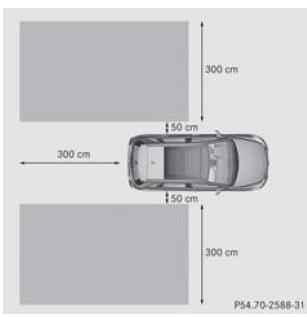
The area monitored by Blind Spot Assist is shown in the illustration. It extends up to 3 meters behind the vehicle and to the sides.
When lanes are narrow, vehicles located one lane further away may be indicated, especially if their lateral position is considerably offset. This can occur, for example, when vehicles drive on the inside of the lane.
Due to its design,
- the system may issue warnings in error in the presence of guardrails or other separations
- the system may interrupt a warning when you drive for a certain time alongside vehicles of unusual length (a truck, for example)
The 2 Blind Spot Assist sensors are integrated in the rear bumper, one on each side. Make sure the sensor area is free of dirt, ice or slush. The radar sensors must never be covered, for example by a bicycle carrier or part of the load. After a severe collision or if the bumper has been damaged, have the function of the radar sensors checked by a qualified workshop. Otherwise, Blind Spot Assist may not function correctly.
Displays
WARNINGBlind Spot Assist does not function below 30 km/h. The indicator lamps integrated in the exterior mirrors are permanently lit in amber. In this case, vehicles in the monitoring area are not displayed.
Always pay attention to traffic conditions and your immediate surroundings in order to detect hazards in time. Otherwise, you may cause an accident and injure yourself or others.
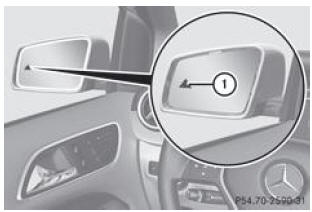
- Amber indicator lamp/red warning lamp
If Blind Spot Assist is activated, the indicator lamp 1 integrated in the exterior mirrors remains permanently lit in amber up to a speed of 30 km/h. From 30 km/h, the lamp goes out and Blind Spot Assist is operational.
If a vehicle is detected in the monitoring zone from approx. 30 km/h onward, the warning indicator 1 on the corresponding side lights up red. You are always warned when a vehicle approaches the monitoring zone from behind or from either side. If you overtake, the system only issues a warning when the speed difference is less than 12 km/h.
When you engage reverse, the orange indicator goes out. The blind spot warning is then not activated.
The brightness of the indicators is adjusted automatically depending on the ambient light.
Collision warning
If a vehicle is detected in the monitoring zone and you turn on the turn signal on the corresponding side, a double warning signal sounds once. The red warning indicator 1 flashes. If the turn signals remain on, detected vehicles are signaled by the red warning indicator 1 flashing. No other audible warning sounds.
Activating the blind spot warning
- For vehicles without an integrated navigation system, make sure the Becker® MAP PILOT is connected (see the specific operating instructions for the Audio 20 system).
- Make sure the radar sensor system and the blind spot warning are activated in the on-board computer.
- Turn the key to position 2 in the ignition switch.
The warning indicators 1 integrated in the exterior mirrors light up red for approx. 1.5 seconds, then orange.
Towing a trailer
When a trailer is attached, make sure the electrical connection is properly established. To do this, check the trailer lighting, for example. The blind spot warning is then deactivated. The indicator integrated in the exterior mirrors lights up orange and the message Blind spot warning not available at present, see owner's manual appears on the multifunction display.
You can switch off the indicator lamp integrated in the exterior mirrors.To do this, you must deactivate the blind spot warning when
- the key is in position 2 in the ignition switch
- the engine is not running
- the electrical connection to the trailer is established
Lane departure warning
General notes
The lane departure warning monitors the area in front of your vehicle using a camera mounted behind the windshield, at the top. If the lane departure warning detects lane markings, it warns you of an unintentional lane change.
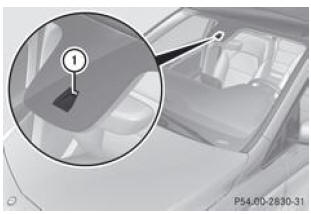
- Lane departure warning camera
If you have selected the km display unit in the Tachometer/odometer display unit function of the on-board computer, the lane departure warning assists you from 60 km/h. If you have selected the mph display unit, the system is activated from a speed of 40 mph.
Important safety notes
WARNINGThe lane departure warning does not keep the vehicle in its lane. It is only an assistance system that may not always detect lane markings correctly. It may also not detect them at all.
The system may be impaired or may not function.
- when visibility conditions are poor (e.g. insufficient road lighting, snowfall, rain, fog or spray)
- when dazzled by oncoming vehicles, the sun or reflections from other vehicles, for example
- if the windshield in front of the camera is dirty, fogged up or covered by a sticker, for example
- when there are no lane markings or there are multiple markings
- when lane markings are worn, faded or covered with dirt or snow, for example
- when the distance to the vehicle ahead is too short and the lane markings therefore cannot be detected
- when lane markings are ambiguous (e.g. near roadworks)
- when lane markings change rapidly (e.g. where lanes split, cross or merge)
- when the road is very narrow and winding
The lane departure warning is not able to assess road or traffic conditions. It cannot replace your attention. You are responsible for the vehicle's speed, whether to brake and how to steer. Always adapt your driving style to the current road and weather conditions. Always pay attention to traffic conditions and your immediate surroundings so that you can detect hazards in time. Otherwise, you could cause an accident and injure yourself or others.
A warning may be issued when a front wheel crosses a lane marking. You are then warned by an intermittent vibration in the steering wheel lasting up to 1.5 seconds.
Activating the lane departure warning
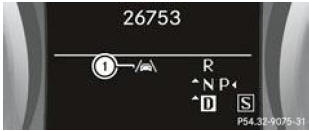
Vehicles with automatic transmission (example)
- Activate the lane departure warning via the on-board computer, then select Standard or Adaptive.
Symbol 1 appears on the multifunction display.
When you drive faster than 60 km/h and the system detects lane markings, the symbol lights up highlighted. The lane departure warning is operational.
If you select Standard, no vibration warning is issued when
- you have turned on the turn signals. Warnings are then suspended for a certain time.
- an active safety system intervenes (ABS, BAS or ESP®, for example)
If you select Adaptive, no vibration warning is issued when
- you have turned on the turn signals. Warnings are then suspended for a certain time.
- an active safety system intervenes (ABS, BAS or ESP®, for example)
- you accelerate hard (kickdown, for example)
- you brake hard
- you steer actively (during an evasive manoeuvre or a quick lane change, for example)
- you take a tight corner
So that you are warned in time and to avoid unnecessary alerts when crossing lane markings, the system is able to identify different situations.
The vibration warning is issued earlier when
- you are taking a bend and approaching the lane marking on the outside of the bend
- you are driving on very wide lanes, for example on a motorway
- the system detects continuous lane markings
However, the vibration warning is issued later when
- you drive on a narrow lane
- you cut a corner
Test yourself
A quick Mercedes-Benz B-Class quiz: every answer comes with an explanation and a link to the manual page.