Additional Service When Replacing Bcm
Description
Perform the following operations when replacing BCM. For details, refer to Work Procedure.
AFTER REPLACEMENT
Writing vehicle specification
Pairing of BCM and Intelligent Key unit
Register of vehicle identification number
Writing MAC key
Tire pressure sensor ID registration
Remote engine start function activation
Work Procedure
REPLACE BCM
Replace BCM. Refer to Removal and Installation.
>>GO TO 2.
WRITING vehicle SPECIFICATION
Perform configuration (BCM). Refer to Description.
>>GO TO 3.
PAIRING OF BCM AND INTELLIGENT KEY UNIT
Perform the pairing of BCM and Intelligent Key unit. Press UNLOCK button of Intelligent Key.
>>GO TO 4.
REGISTER OF vehicle IDENTIFICATION NUMBER
With CONSULT
Select “VIN registration” of BCM (BCM) work support item.
Refer to CONSULT and follow the on-screen instructions.
GO TO 5.
WRITING MAC KEY
Perform MAC key writing. Refer to Description.
>>GO TO 6.
TIRE PRESSURE SENSOR ID REGISTRATION
Perform the initialization and registration of tire pressure sensor ID. Refer to Description.
>>GO TO 7.
REMOTE ENGINE START FUNCTION ACTIVATION
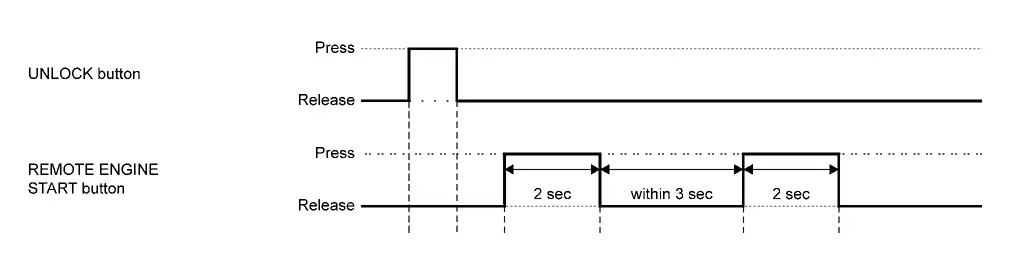
Press the UNLOCK button of Intelligent Key.
Press REMOTE ENGINE START button of Intelligent Key for 2 seconds.
Release REMOTE ENGINE START button, and press REMOTE ENGINE START button of Intelligent key again within 3 seconds for 2 seconds.
WORK END